
Participant
February 19, 2018
Answered

Shift-click open as smart object not working

  • February 19, 2018
  • 2 replies
  • 936 views

I am trying to open raw files from camera raw as smart object layers and when I "shift-click" to open them as smart objects, nothing happens. The "open image" option does not show "open as smart object" and when I do perform a shift-click, it opens the file but it is not a smart object. Do I need to convert the NEF files to another type or am I missing something else. I am working from Bridge to Photoshop trying to blend multiple exposures in photoshop and I need them to be smart objects so I can click each layer and edit in camera raw. I can change my default settings to always open as a smart object and that will allow me to open them correctly but I don't always want to do this and don't understand why the shift-click is not working. Thanks  Also, running the latest photoshop cc updates/camera raw and working with nikon raw files and using a Mac
This topic has been closed for replies.
Correct answer JJMack

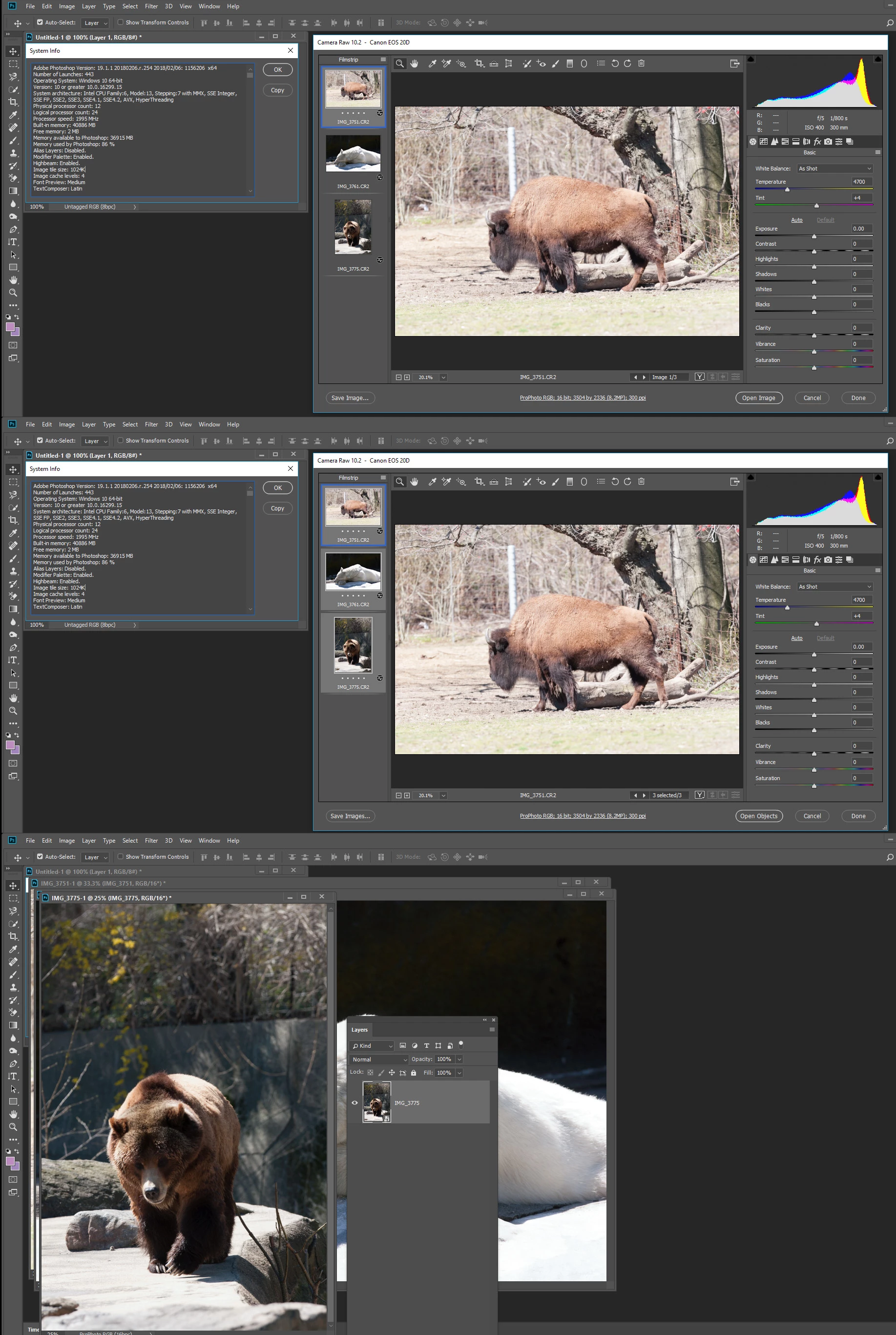
I use canon Cameras there is no problem on my Windows 10 Workstation using Photoshop CC 2018, ACR 10.2.1 opening mat Canon CR2 Files in ACR selecting all the thumbnails pressing Shift and clicking on Open Objects. To open Documents with Smart Object layer containing my image.   Have you ever thought about switching to Canon Nikon user.

2 replies

Participant
September 27, 2019

This kind of help, try it out maybe it'll work for you


https://www.youtube.com/watch?v=74IEM2sMzPc


JJMack
Community Expert
JJMackCommunity ExpertCorrect answer
Community Expert
February 19, 2018

I use canon Cameras there is no problem on my Windows 10 Workstation using Photoshop CC 2018, ACR 10.2.1 opening mat Canon CR2 Files in ACR selecting all the thumbnails pressing Shift and clicking on Open Objects. To open Documents with Smart Object layer containing my image.   Have you ever thought about switching to Canon Nikon user.

JJMack