
Mulgravebrad
Inspiring
February 23, 2017
Answered

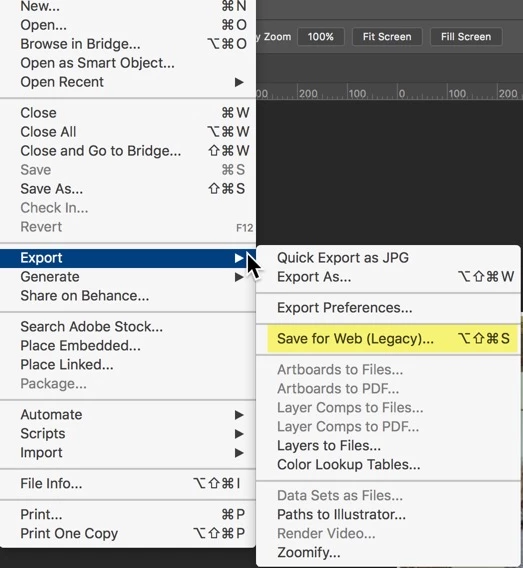
Shortcut for 'Save for Web' doesn't work on my Mac.

  • February 23, 2017
  • 1 reply
  • 5960 views

I'm on a Mac using the latest Sierra. I can't get this shortcut to work. If I mouse to the Command, it works fine but it's a bit of travelling in Photoshop CC. I use Shortcuts a lot. It's interesting that it doesn't work in neither Elements nor Photoshop. Could it be a clash with the same command on my Mac?
    This topic has been closed for replies.
    Correct answer Sahil.Chawla

    Hi Mulgravebrad,

    Command + Option + Shift + S doesn't work for you? Does it do nothing? Give an error?

    May I know which version of Photoshop CC are you using?

    You can customize the shortcut to use a shorter key combination by selecting Edit > Keyboard Shortcuts.

    Please let us know about the outcome.

    Regards,

    Sahil

    1 reply

    Sahil.Chawla
    Adobe Employee
    Sahil.ChawlaCorrect answer
    Adobe Employee
    February 23, 2017

    Hi Mulgravebrad,

    Command + Option + Shift + S doesn't work for you? Does it do nothing? Give an error?

    May I know which version of Photoshop CC are you using?

    You can customize the shortcut to use a shorter key combination by selecting Edit > Keyboard Shortcuts.

    Please let us know about the outcome.

    Regards,

    Sahil

    Mulgravebrad
    Inspiring
    February 23, 2017

    2017.0.1 Release.

    Command +Shift+Option+S doesn't do anything in either Elements or Photoshop. When I mouse down the menu to that shortcut, it works, but I prefer to use shortcuts where possible.

    I did as you suggested and changed the shortcut to Control+Command+K. It now works.

    Thank you for your help Sahil. Much appreciated.

    Sahil.Chawla
    Adobe Employee
    Adobe Employee
    February 23, 2017

    Glad you got it working! Feel free to reach out to us for any future queries.