Inspiring
August 26, 2021
Answered

Show clipping in photoshop (like in Camera Raw Filter)

  • August 26, 2021
  • 3 replies
  • 3394 views

Hi

I use 'show clipping highlights' alot, but i always have to switch into Camera raw filter to see them. Isnt it possible just to show them in photoshop itsself ?
Thinking about it now, maybe you cant as photoshop might be many layers, and CRF is one layer.?
This topic has been closed for replies.
Correct answer Chuck Uebele

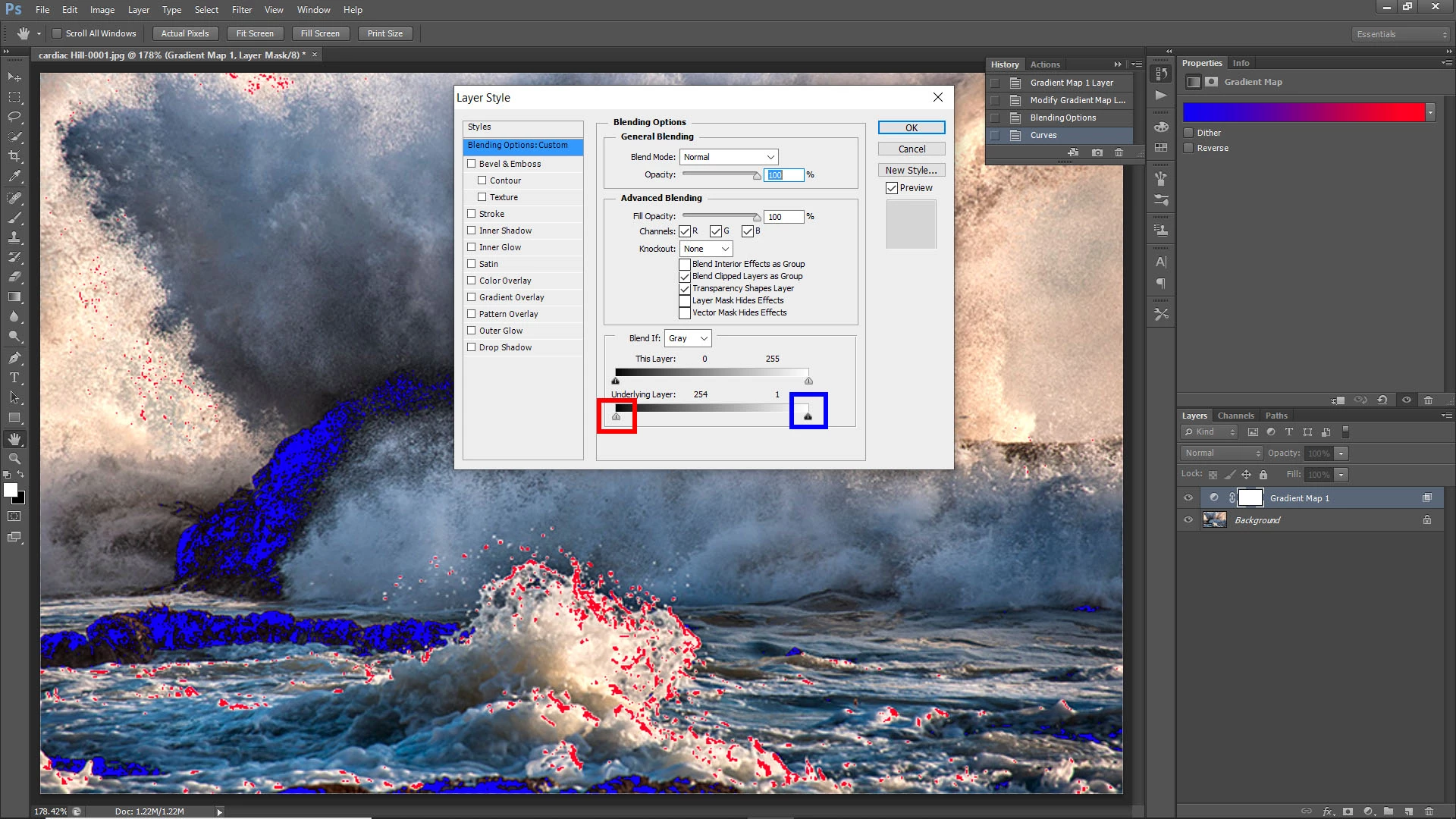
Similar to Dave's suggestion, But Mine is to use the gradient map. Make a gradient map adjustment layer with blue and red, Then use the blend if sliders to adjust how you want the clipping. Use the underlaying layer sliders and swap them to the highlights are at the shadow side and the shadows are at the highlight side. You can then save this as a preset and load it for other files.


3 replies

NB, colourmanagement
Community Expert
Community Expert
August 31, 2021

On Mac,

I use Image/ adjust levels then hold down the 'alt' key whilst mosign down and sliding inwards either input levels end arow. Reveals, in turn, clipping of highlights and shadows.


I hope this helps
neil barstow, colourmanagement net :: adobe forum volunteer
google me "neil barstow colourmanagement" for lots of free articles on colour management
[please only use the blue reply button at the top of the page, this maintains the original thread title and chronological order of posts]


Chuck Uebele
Community Expert
Chuck UebeleCommunity ExpertCorrect answer
Community Expert
August 26, 2021

Similar to Dave's suggestion, But Mine is to use the gradient map. Make a gradient map adjustment layer with blue and red, Then use the blend if sliders to adjust how you want the clipping. Use the underlaying layer sliders and swap them to the highlights are at the shadow side and the shadows are at the highlight side. You can then save this as a preset and load it for other files.


Inspiring
August 26, 2021

Thanks for the tips, i think its quicker for me just go into CRF for now, but i can see thats useful, thanks

davescm
Community Expert
Community Expert
August 26, 2021

Hi

Add a colour fill layer above your image layer(s) set to whatever colour you want to use as an indicator

Right click in the layers panel and choose Blending options

In "Blend If " drag the black slider to the right until it reaches the level at which you want the clipping indicator to show (I've used 253 in the example below)


Dave