Photoshop works in whole pixels not in inches (or cm or mm). No raster image can have fractions of a pixel.
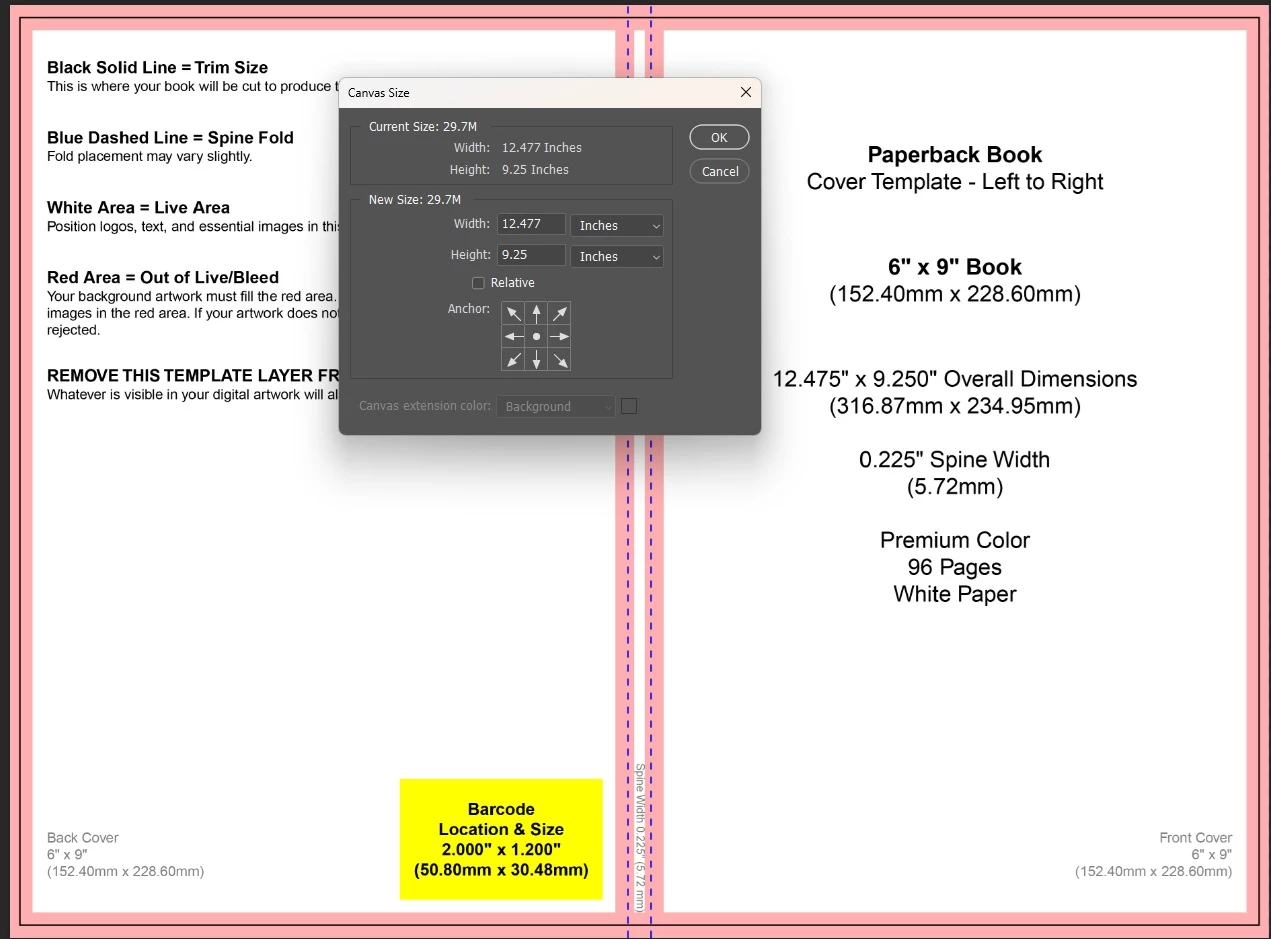
So when you enter 12.475 inches x 9.250 inches using a ppi figure of say 300ppi that would be 3742.5 x 2775 pixels. As stated above you can't have a half a pixel so it becomes 3743 x 2775 pixels which when translated back to inches gives 12.477 x 9.25 inches.
Working in the given mm dimensions 316.87 x 234.95 mm @300ppi also translates to 3742.6 x 2775 pixels which when rounded to whole pixels is 3743 x 2775 pixels. Translated back to mm it gives 316.91 x 234.95 mm so it has the same 'oversize issue'
I am surprised that your cover is being rejected for 0.002 of an inch over width particularly when their own dimension in mm ar 0.001 of an inch out from their dimensions in inches.
However as a way around it I would - create the document in Photoshop at the size given (accepting the rounding). Create an InDesign doc at the dimensions given (12.475 x 9.250 inc bleed) and place the Photoshop document into it using the top and bottom to hit the bleed edge exactly. Then export a PDF from InDesign inc the bleed. That PDF should be at the exact dimensions they require.
Dave



 AdChoices