MahaB82A
August 7, 2023
解決済み

Size of this folders

  • August 7, 2023
  • 返信数 4.
  • 549 ビュー

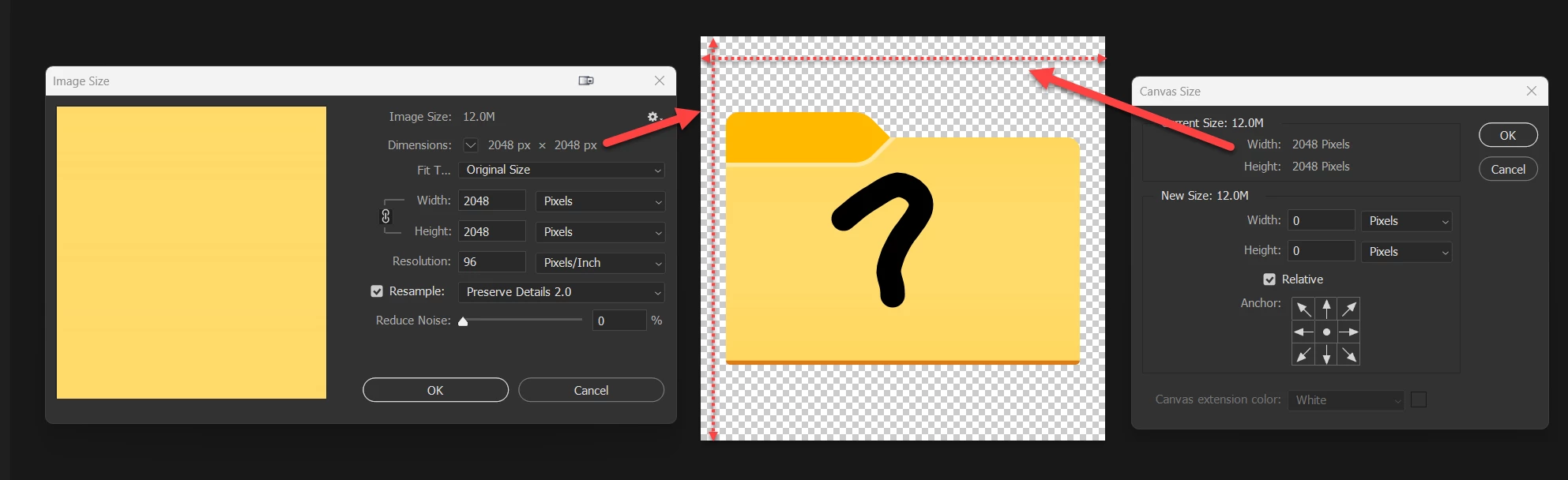
This dialog box shows the Canvas Size. How to get a size of this folders? 
 

このトピックへの返信は締め切られました。
解決に役立った回答 silk-m

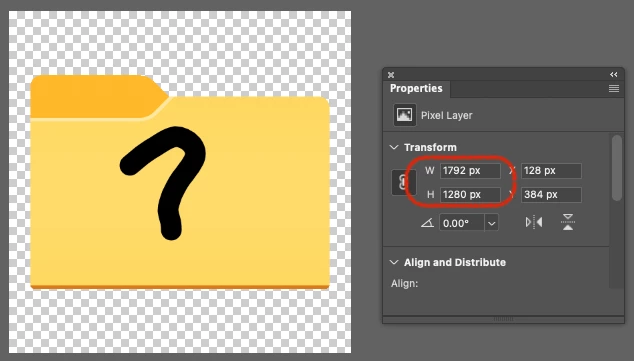
The Properties panel shows the size without transparent pixels.
返信数 4

MahaB82A
MahaB82A作成者
August 7, 2023

Thease two foders are in my Windows Explorer. You can notice red folder size is bigger than the yellow folder but pixel value is higher number in yellow folder. I am seraching for that reson. All these icons are downloaded and required images are placed embeded .


Myra Ferguson
Community Expert
Community Expert
August 7, 2023

I'm guessing that the pixel density of the red folder is greater than the yellow folder. Go to Image > Image Size... and see not only what the dimension are for Width and Height but also what the Resolution is in Pixels/Inch (PPI).

MahaB82A
MahaB82A作成者
August 7, 2023

Thanks for all.

silk-m
Community Expert
silk-mCommunity Expert解決!
Community Expert
August 7, 2023

The Properties panel shows the size without transparent pixels.

--Susumu Iwasaki
MahaB82A
MahaB82A作成者
September 25, 2023

@silk-m wrote:

The Properties panel shows the size without transparent pixels.


If properties panel shows the size without transparent pixels, Why Image Size values are different from Transform values? 

Myra Ferguson
Community Expert
Community Expert
August 7, 2023

If you want to see just the size of the folder, when you select it with the Rectangular Marquee Tool, Photoshop will show the dimensions of the selection in the lower right as you draw (before releasing the mouse).


After you've made the selection and released the mouse, you can also view the width (W) and height (H) in the Properties panel (Window > Properties).
