
Inspiring
March 4, 2023
Answered

Slow computer

  • March 4, 2023
  • 2 replies
  • 3135 views

My computer slowed down to the point of taking it to the shop.  There we found that Photoshop is taking up so much memory, it is the cause.  I had another memory stick installed and even after that, it is slowing down after being open for awhile.  I hate having to shut everything down and reboot but it is the only way to get my speed back.

Anybody else run into this problem?  Can anything be done?

Running Windows 10, using Photoshop 2023
This topic has been closed for replies.
Correct answer D Fosse

Also, there's a more subtle disadvantage with using integrated graphics: they use system memory. A discrete GPU doesn't do that; it has its own dedicated onboard memory.


A GPU can potentially eat up a lot of memory. There's a timing factor here: Photoshop tends to allocate large amounts of memory quickly, while the GPU will need it gradually as you work. But by then there may be nothing left.


Make sure you're not setting Photoshop's memory usage too high in Preferences. It should be around 60 - 70%, not higher.


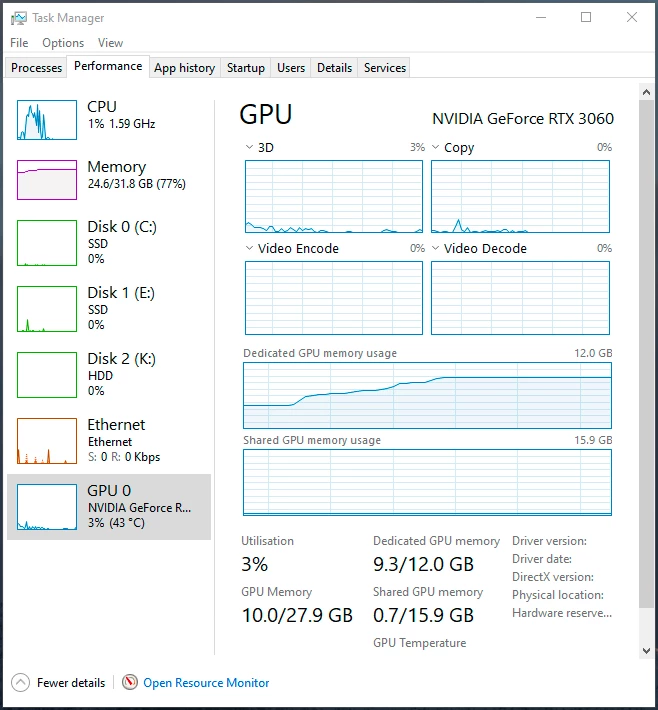
I also suggest you monitor memory usage closely. As you can see here, the GPU can use a lot. Here it uses almost 10 GB VRAM, in addition to the 25 GB system RAM already in use.

2 replies

D Fosse
Community Expert
D FosseCommunity ExpertCorrect answer
Community Expert
March 4, 2023

Also, there's a more subtle disadvantage with using integrated graphics: they use system memory. A discrete GPU doesn't do that; it has its own dedicated onboard memory.


A GPU can potentially eat up a lot of memory. There's a timing factor here: Photoshop tends to allocate large amounts of memory quickly, while the GPU will need it gradually as you work. But by then there may be nothing left.


Make sure you're not setting Photoshop's memory usage too high in Preferences. It should be around 60 - 70%, not higher.


I also suggest you monitor memory usage closely. As you can see here, the GPU can use a lot. Here it uses almost 10 GB VRAM, in addition to the 25 GB system RAM already in use.

pslane1Author
Inspiring
March 7, 2023

I did all the suggested things, including updating my driver.  It seems better so far, I hope it stays that way.

Thank you.

Bojan Živković11378569
Community Expert
Community Expert
March 4, 2023

Can you copy/paste here content of Help > System Info in Photoshop?

pslane1Author
Inspiring
March 4, 2023

Adobe Photoshop Version: 24.1.1 20230112.r.238 4bbfa7a x64
Number of Launches: 51
Operating System: Windows 10 64-bit
Version: 10 10.0.19045.2673
System architecture: Intel CPU Family:6, Model:5, Stepping:3 with MMX, SSE Integer, SSE FP, SSE2, SSE3, SSE4.1, SSE4.2, AVX, AVX2, HyperThreading
Physical processor count: 6
Logical processor count: 12
Processor speed: 2904 MHz
Built-in memory: 11931 MB
Free memory: 7635 MB
Memory available to Photoshop: 8521 MB
Memory used by Photoshop: 70 %
Crash Handler: Adobe
DCX Version: 6.15.3
SAM SDK Version: 2.0.0-main.1564
ACP.local Status:
- SDK Version: 2.11.0
- Core Sync Status: Reachable and compatible
- Core Sync Running: 6.2.0.5
- Min Core Sync Required: 4.3.66.28
Live Edit Client SDK Version: 3.91.3
Content Credential Helper Version: 0.5.3
Manta Canvas: Enabled.
Alias Layers: Disabled.
Modifier Palette: Enabled.
Highbeam: Enabled.
Pentablet
Spec Version 1.1
Impl Version 1.0
Num Devices 1
Image tile size: 1024K
Image cache levels: 4
Font Preview: Medium
HarfBuzz Version: 4.3.0
TextEngine: Unified Text Engine
======= GPU
Native API stable: True
OpenGL API stable: True
OpenCL API stable: True
D3D12Warp renderer: False
GPUDeny: 0
GPUForce: 0
useGPU: 1
useOpenCL: 1
isGPUCapable: 1
GPUName: Intel(R) UHD Graphics 630
GPUVendor: INTEL
IsNativeGPUCapable: 1
IsOpenGLGPUCapable: 1
IsOpenCLGPUCapable: 1
HasSufficientRAM: 1
GPU accessible RAM: 6,389 MB
Required GPU accessible RAM: 1,500 MB
UseGraphicsProcessorChecked: 1
UseOpenCLChecked: 1
Windows remote desktop: 0
Display: 1
Display Bounds: top=0, left=0, bottom=1080, right=1920
------- Sniffer output
[0 ms]
Launch GPUSnifferThread

[0 ms]
Start RunAllAPIs

[0 ms]
"C:\Program Files\Adobe\Adobe Photoshop 2023\sniffer.exe" -baseTimeMS=133755 -comment=Photoshop Version: Adobe Photoshop 24.1.1 20230112.r.238 4bbfa7a x64

[913 ms]
Start sniffer 2023-03-04 09:05:08
# Photoshop Version: Adobe Photoshop 24.1.1 20230112.r.238 4bbfa7a x64
C:\Program Files\Adobe\Adobe Photoshop 2023\sniffer.exe -baseTimeMS=133755 -comment=Photoshop Version: Adobe Photoshop 24.1.1 20230112.r.238 4bbfa7a x64

{105 ms}
Start platform native
# displays: 1
Display 0
Display: \\.\DISPLAY1
Main: TRUE
Built in: FALSE
Stereo: FALSE
Bounds: (0, 0) -> (1,920, 1,080)
Dimensions: (1,920 1,080)
Physical size: (0 0)
Pixel size: (0 0)
Dynamic range: (0 1)
Potential dynamic range: (0 1)
Reference dynamic range: (0 0)
Attached Device: (DeviceID name=Intel(R) UHD Graphics 630 index=0)

# devices: 1
Device 0
Name: Intel(R) UHD Graphics 630
Preferred: TRUE
Power Envelope: UNKNOWN
Attachment: UNKNOWN
# attached displays: 1
\\.\DISPLAY1
GPU accessible RAM: 6,389 MB
VRAM: 134 MB
Dedicated System RAM: 0 MB
Shared System RAM: 6,255 MB
API version: 12.0 (12.0)
Device version: 12.0 (12.0)
Vendor name: INTEL
Driver date: 2020-09-24 000000.000000-000
Driver age: 30 months
Driver version: 27.20.100.8783
Supports UMA: SUPPORTED
D3D-ID: 39880
End platform native
{160 ms}

{160 ms}
Start platform OpenGL
# displays: 1
Display 0
Display: \\.\DISPLAY1
Main: TRUE
Built in: FALSE
Stereo: FALSE
Bounds: (0, 0) -> (1,920, 1,080)
Dimensions: (1,920 1,080)
Physical size: (0 0)
Pixel size: (0 0)
Dynamic range: (0 1)
Potential dynamic range: (0 1)
Reference dynamic range: (0 0)
Attached Device: (DeviceID name=Intel(R) UHD Graphics 630 index=0)

# devices: 1
Device 0
Name: Intel(R) UHD Graphics 630
Preferred: TRUE
Power Envelope: INTEGRATED
Attachment: UNKNOWN
# attached displays: 1
\\.\DISPLAY1
GPU accessible RAM: 6,389 MB
VRAM: 134 MB
Dedicated System RAM: 0 MB
Shared System RAM: 6,255 MB
API version: 4.6 (4.6.0 - Build 27.20.100.8783)
Device version: 4.6 (4.6.0 - Build 27.20.100.8783)
Vendor name: INTEL
Driver date: 2020-09-24 000000.000000-000
Driver age: 30 months
Driver version: 27.20.100.8783
GLSL version: 4.60 (4.60 - Build 27.20.100.8783)
End platform OpenGL
{188 ms}

{188 ms}
Start platform OpenCL
# displays: 0

# devices: 1
Device 0
Name: Intel(R) UHD Graphics 630
Preferred: TRUE
Power Envelope: INTEGRATED
Attachment: UNKNOWN
# attached displays: 0
GPU accessible RAM: 5,004 MB
VRAM: 5,004 MB
Dedicated System RAM: 0 MB
Shared System RAM: 0 MB
API version: 2.1 (OpenCL 2.1 )
Device version: 2.1 (OpenCL 2.1 NEO )
Vendor name: INTEL
Driver date: UNKNOWN
Driver age: UNKNOWN
Driver version: UNKNOWN
Bandwidth: 13 GB / s
Compute score: 140.93
Device name string: Intel(R) UHD Graphics 630
Device vendor string: Intel(R) Corporation
Platform name string: Intel(R) OpenCL HD Graphics
Platform vendor string: Intel(R) Corporation
End platform OpenCL
{833 ms}

Exit code kExitNormal
End sniffer 2023-03-04 09:05:09
[kStatusNormal, kExitNormal]

[913 ms]

Bojan Živković11378569
Community Expert
Community Expert
March 4, 2023

First noticable issue is driver date, it is outdated (30 months) Try to update driver before anything else.