PAWNSHOP
Participant
September 9, 2017
Answered

Smart Filters not working on smart objects on CC 2017 with new computer

  • September 9, 2017
  • 1 reply
  • 21273 views

Smart filters is always greyed out (not clickable) in my new downloaded version of Adobe Photoshop CC. My Adobe is up to date. I have searched all other threads.

My settings are RGB and 8 bit/channel. I have turned on "Show all filters" in preferences/plug-ins. I thought this may have to do with the files I am working with, but even after closing those files, restarting photoshop with the new preferences clicked, and opening a very simple clean file with a one path shape converted to smart object the option is still greyed out (also not working with a hand drawn circle with marquee that is not a smart object).

This is VERY frustrating. Is there a plug in I may be missing? A different preference that needs to be set? I have never had this problem on my old computer running the exact same version of Adobe CC. 

Any help welcome, but please please please do not mention my color mode needing to be RGB and set to 8-bit/channel. I know this. It is literally NEVER working (not greyed out).
This topic has been closed for replies.
Correct answer davescm

What you are showing is normal.

See example below:

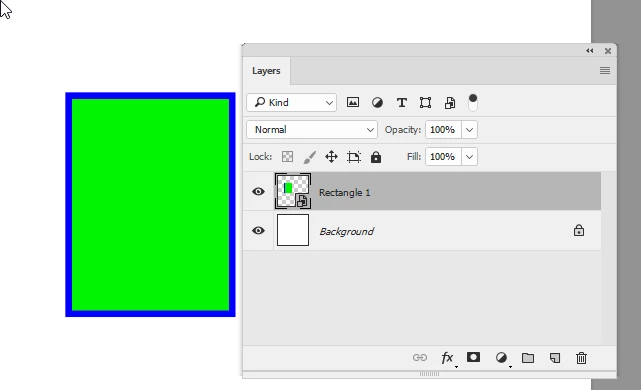
1. A single layer converted to smart object

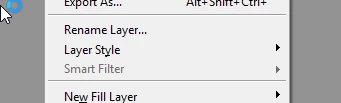
2. At this stage the layer menu smart filter is greyed as no smart filter has been applied

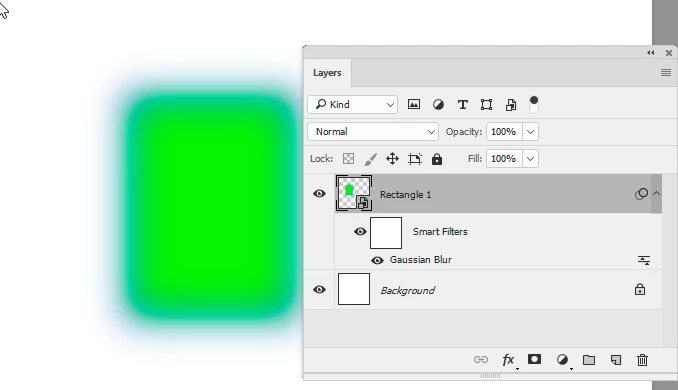
3. If I go to the filter menu and use any filter (I've used Gaussian blur in this example) then the filter is applied as a smart filter

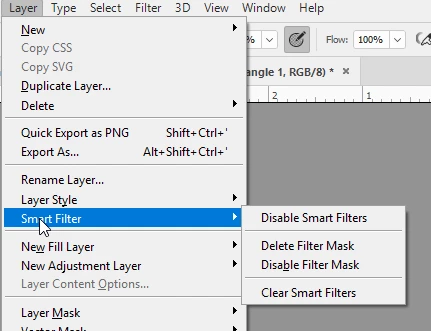
4. Now that a smart filter has been applied to the layer , the Smart filter sub menu is available in the layers menu

This was CC2017.1.1 but I've just checked and CS6 worked the same way

Dave

1 reply

davescm
Community Expert
Community Expert
September 9, 2017

Hi

Convert for Smart Filters just converts the layer to a smart object. If your selected layer is already a smart object then "Convert for Smart Filters" will be greyed out as there is no need for the conversion. Filters will just be applied to that smart object in the same way.

On the example you gave of the hand drawn circle with marquee - can you show a screenshot including the layers panel

Dave

PAWNSHOP
PAWNSHOPAuthor
Participant
September 9, 2017

Thanks for the reply Dave, unfortunately this isn't my question. I know smart objects very well (I have been using photoshop since 2002) Not bragging, I know there are many people way more advanced than I am, just want to give context that I am not a novice.

The issue is the option to apply smart filters to my smart objects or layers of any kind. I would typically just apply filters to smart objects previously and they would automatically work as smart filters, though to highlight the issue below I have shown the particular option that I am missing as well as my image settings to avoid any Bit/Channel or Color Mode advice. 

Ref:

davescm
Community Expert
davescmCommunity ExpertCorrect answer
Community Expert
September 9, 2017

What you are showing is normal.

See example below:

1. A single layer converted to smart object

2. At this stage the layer menu smart filter is greyed as no smart filter has been applied

3. If I go to the filter menu and use any filter (I've used Gaussian blur in this example) then the filter is applied as a smart filter

4. Now that a smart filter has been applied to the layer , the Smart filter sub menu is available in the layers menu

This was CC2017.1.1 but I've just checked and CS6 worked the same way

Dave