Participant
May 31, 2019
Question

Smart Filters Trouble

  • May 31, 2019
  • 2 replies
  • 191 views

I am trying to learn and use the low poly technique. As I was doing tutorials, and I am now having trouble.

2 things:

1. When I draw with the polygon lasso tool, the guide line will not show up until I have closed the polygon (It was working earlier tonight and just stopped at some point).

2. After drawing the polygon, I choose filter>average and it does what is pictured on the screen shot below. Again, this was working earlier tonight just fine for the effect I was wanting to achieve, so I must have clicked something along the way. Any ideas? The only thing I can attribute it to is something with smart filters. I have tried clearing those, as well as closing out of photoshop completely and starting with a new practice image.

Thank you in advance!
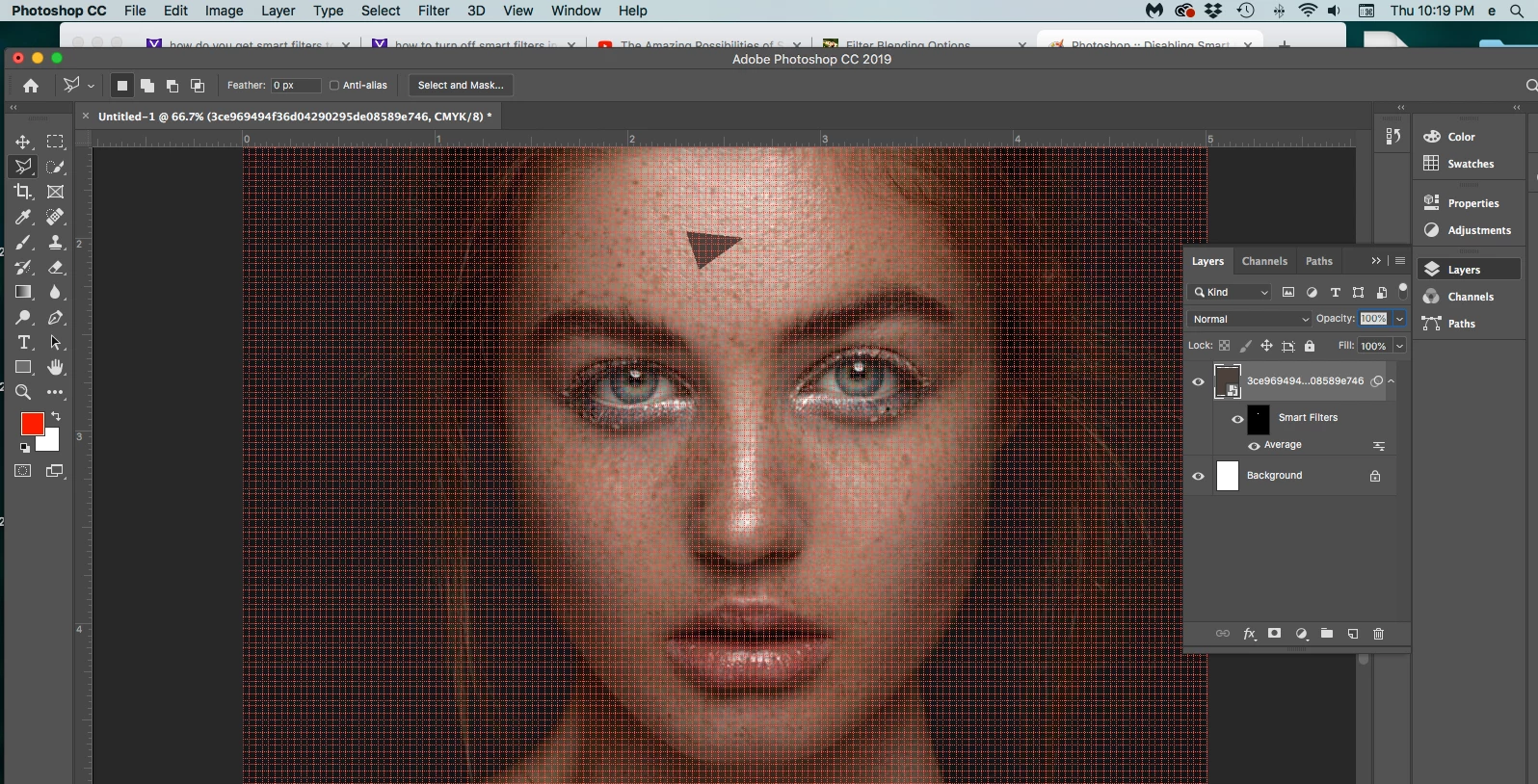
[Discussion moved from Adobe Creative Cloud to Photoshop]

This topic has been closed for replies.

2 replies

c.pfaffenbichler
Community Expert
Community Expert
May 31, 2019
1. When I draw with the polygon lasso tool, the guide line will not show up until I have closed the polygon (It was working earlier tonight and just stopped at some point).

Have you seen this thread?

Lasso Tool Lines not showing as I'm selecting 

Participant
May 31, 2019

I will look at the lasso thread you provided tonight to see if that takes care of the issue. Weird that it would be working one minute and the not, in the same session. Thank you!

c.pfaffenbichler
Community Expert
Community Expert
May 31, 2019

A am afraid the technique you are trying to use needs to be applied destructively.

The Average Filter as a Smart Filter is applied to the Layer as a whole but has a Layer Mask (edit: or rather »Filter effects mask«).

Participant
May 31, 2019

When I originally started working on this, I was able to go to “Filter>average” and get it to work. Sometime while playing around with it, I used the smart filter feature to see what it would do. Now I can’t seem to get it to go away. I don’t want to be using the smart filter setting. Any thoughts?

c.pfaffenbichler
Community Expert
Community Expert
May 31, 2019
When I originally started working on this, I was able to go to “Filter>average” and get it to work.

As a Smart Filter it still works – but not on the basis of the Selection but for the whole of the Layer.

I assume you need to apply it to a plain pixel Layer, not a Smart Object.