
Smart object .ai files jagged
I've found a number of threads on here relating to this issue, but none that have solved it.
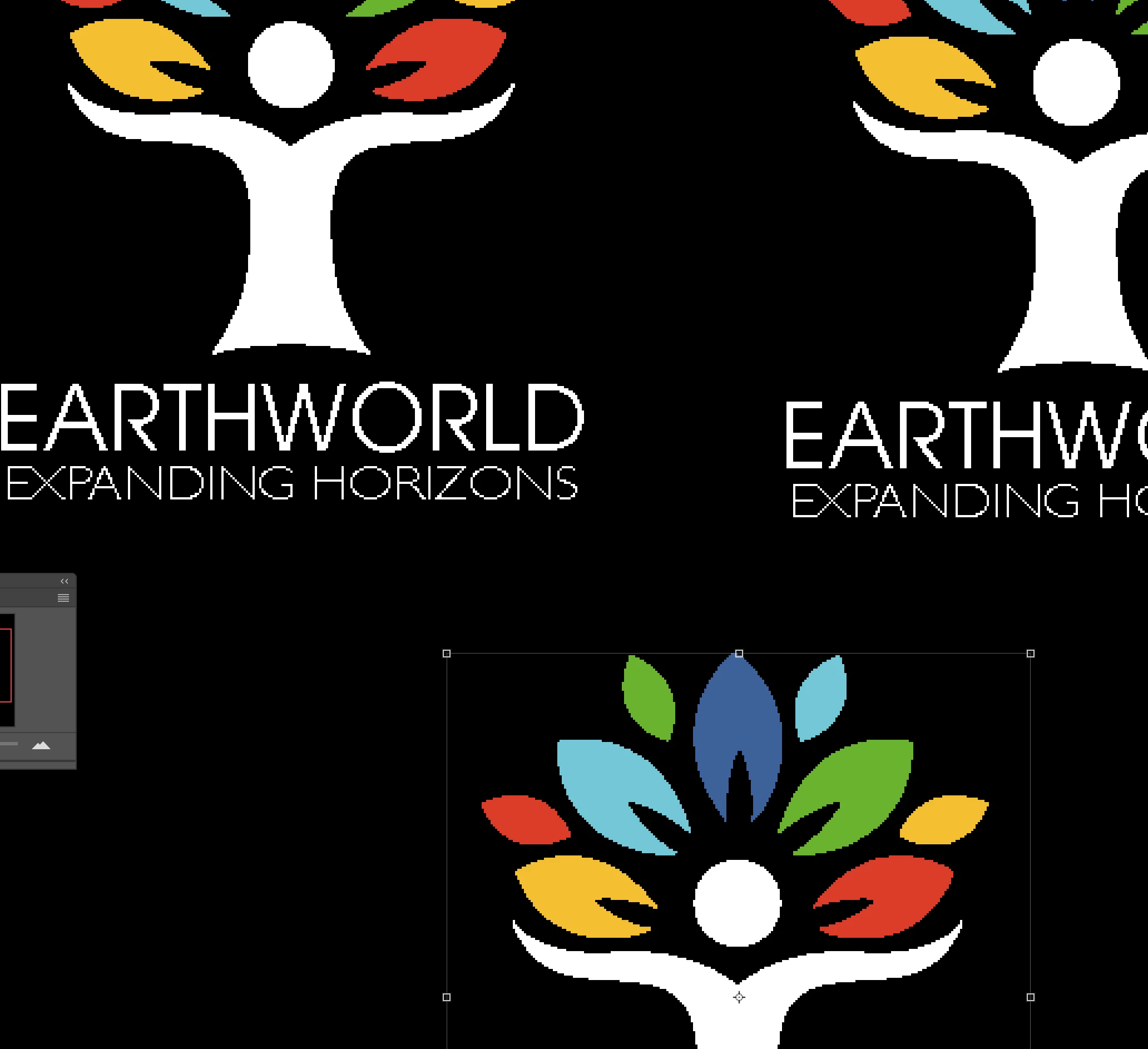
When placing or dragging an Illustrator file, or vector graphic, into Photoshop, the resulting smart object is not anti-aliased. Unless I scale it up, rasterise it, and scale it down again, it's jagged, with no antialiasing.
I've tried changing Preferences > General > Image interpolation (as mentioned in other posts), but this makes no difference, on any setting.
Place-wise, Ive tried …
File > Place command in 'Shop (top-left logo in the attached image),
dragged from the finder (top-right logo),
and copy/pasted from Illustrator (bottom logo, pasted as Smart Object),
… and they all show the same problem, no matter how big or small I scale them, and no matter what my raster setting are. I've also tried scaling the original Illustrator graphic to 500% within Illustrator, before copy/pasting, but that has no effect either.
Playing with the raster settings has zero effect on the placed image in Photoshop. Is there any way a smart object of this type can be improved, other than rasterising it at a large scale first? As it stands, I can't find any use in Smart objects for vector graphics, as they don't give high-quality – even pasting as pixels gives better definition!
 AdChoices