
November 22, 2021
Answered

Smart Object Question

  • November 22, 2021
  • 1 reply
  • 695 views

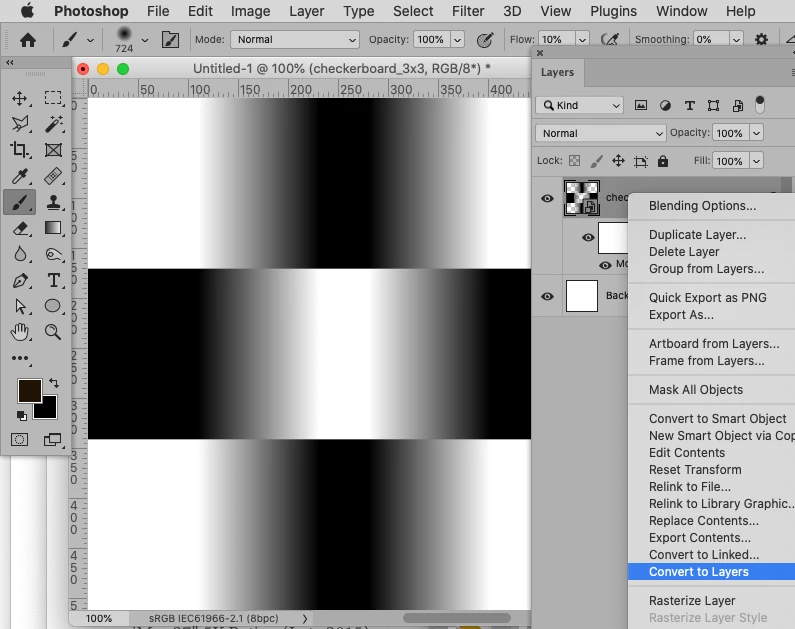
I have a question about Smart Objects in Ps v 23.0.1 Please see enclosed screen shots for reference. I made a layer into a Smart Object, then applied a couple of Blur filters to it. I now want to rasterize that layer. However, when I right click on the layer, my options are to MAKE a Smart Object, and do not include a Rasterize Layer option. It's as though Ps thinks the layer is already rasterized. It definitely is a Smart Object though as I cannot directly edit the layer without double clicking on it and opening the original "version" of it (for instance I cannot apply a brush stroke directly to the layer as it stands here). I've seen this several times now so there's something I'm missing in all this. Any help would be appreciated. Thanks.

iMac 27" 5K Retina (Late 2015)

RAM 32 GB

3 GB DDR Video RAM

1.8 TB free space on Fusion Drive

Monterey v12.0.1

Ps v 23.0.1
This topic has been closed for replies.
Correct answer c.pfaffenbichler

Please post a meaningful screenshot. 

1 reply

c.pfaffenbichler
Community Expert
c.pfaffenbichlerCommunity ExpertCorrect answer
Community Expert
November 22, 2021

Please post a meaningful screenshot. 

November 22, 2021

Sorry, I thought I had posted a "meaningful screenshot" (perhaps a bit more detail in what a "meaningful screenshot" would be in this case would be helpful?). However, you answered my question. I just wasn't looking in the right place as the drop down menu extended beyond my screen. Also, I believe (although I'm not absolutely certain) that the Rasterize Layer option used to be higher on the list.

Thank you for your time and answer.

November 22, 2021

My apologies - perhaps your screenshot was an example of a meaningful screenshot in this case. In any event, I see from your screenshot (which solved my puzzle - thank you) that the Rasterize Layer is near the bottom of the list. So thank you again. Appreciate your help. Problem solved.