
Snap to Points Grid (Working with 144p resolution) [Photoshop]
Hello everyone.
I have a really annoying trouble.
So, on my workplace I have a iMac 5k and because of that I decided to work with the retina-ready documents. Every new document created by me must be in 144p resolution. To simplify my workflow I changed all types of numbers from PX to PT to work with standard values as 14px (14pt) font for web sites. So, my goal is to get the sharp result on the Retina display using 144p resolution for the standard layout with standard values. So before I was creating 1440x900 px layout in 72p and zoom it 2x to get the actual size on retina monitor. Now, avoiding zooming in, I'm using 1440x900 pt in 144p.
So, what is my problem?
As you can see down below, I have 1 PT shape on 1x1 PT grid. (PT in 144p res.) But I still have a fractional value of spacing (0.5 pt), because my 1PT is 2PX.
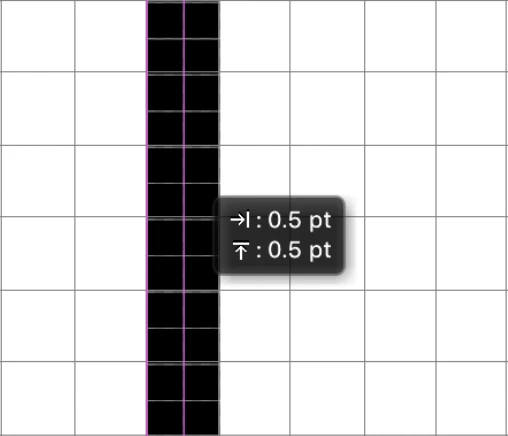
In that case, HOW I can drag this shape by 1 PT? How I can see only points to have a well work on retina monitor?
Thank you
 AdChoices