Bedazzled532
Inspiring
July 25, 2023
Answered

Special Effect

  • July 25, 2023
  • 2 replies
  • 1018 views

Hi

This is my first post in Photoshop forum.

I would like to know how to recreate this effect in Photosop ?

I have tried Bevel, Emboss, Inner shadow. Not getting the same effect.


Thanks


This topic has been closed for replies.
Correct answer Myra Ferguson

You're on the right track. It appears to need a combination of layer styles. You can tweak the settings as desired from what I used below.

 

I made two layers, one for the text and one for the background.


The text uses Bevel & Emboss, Inner Shadow, and Drop Shadow:
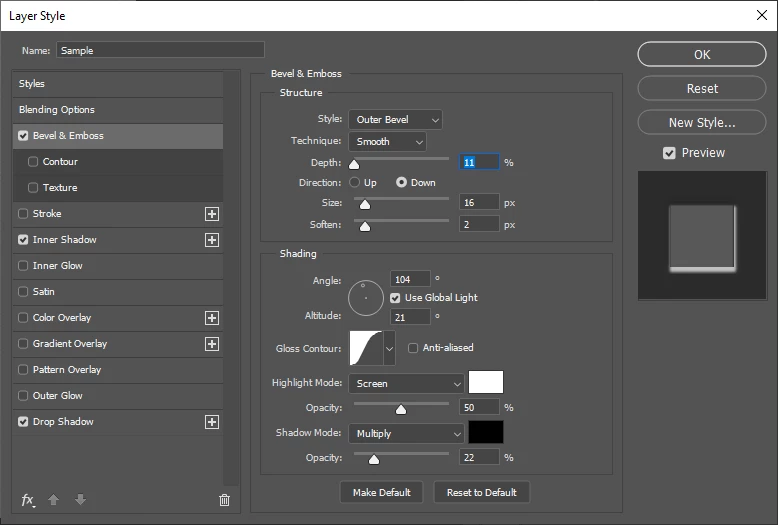
 

For the background, I set foreground to black and background to white, went to Filter > Filter Gallery and in the Sketch section, selected Note Paper.


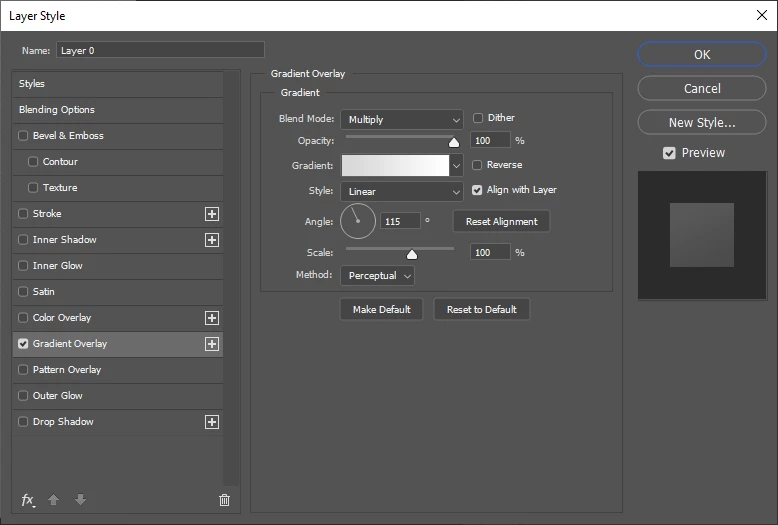
I added a Gradient Overlay to the texture 


2 replies

Myra Ferguson
Community Expert
Myra FergusonCommunity ExpertCorrect answer
Community Expert
July 25, 2023

You're on the right track. It appears to need a combination of layer styles. You can tweak the settings as desired from what I used below.


I made two layers, one for the text and one for the background.


The text uses Bevel & Emboss, Inner Shadow, and Drop Shadow:
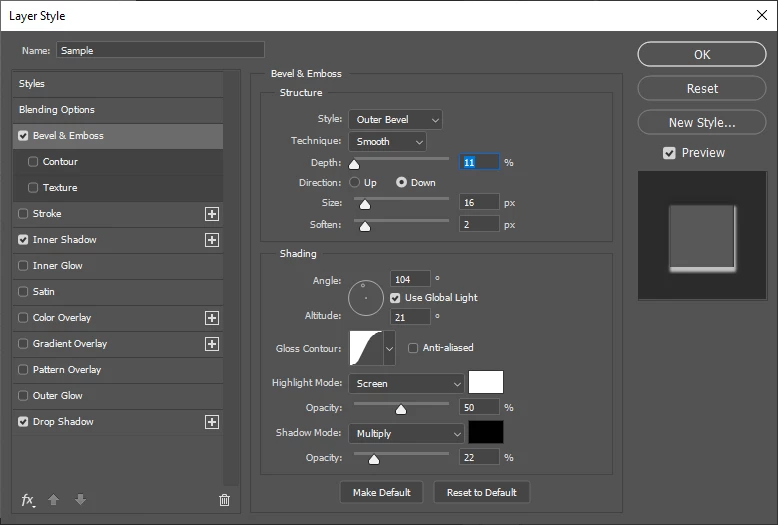
 

For the background, I set foreground to black and background to white, went to Filter > Filter Gallery and in the Sketch section, selected Note Paper.


I added a Gradient Overlay to the texture 


Bedazzled532
Inspiring
July 25, 2023

@Myra Ferguson Thanks a lot Myra.

I really appreciate your effort.  It saved me a lot of work.


Regards

Myra Ferguson
Community Expert
Community Expert
July 25, 2023

You're very welcome. 🙂

Kevin Stohlmeyer
Community Expert
Community Expert
July 25, 2023
Bedazzled532
Inspiring
July 25, 2023

@Kevin Stohlmeyer Thanks for the link. I will go through it.