
dariam41684218
Participant
April 11, 2016
Question

Speed change when making a animated .gif in photoshop

  • April 11, 2016
  • 4 replies
  • 12376 views

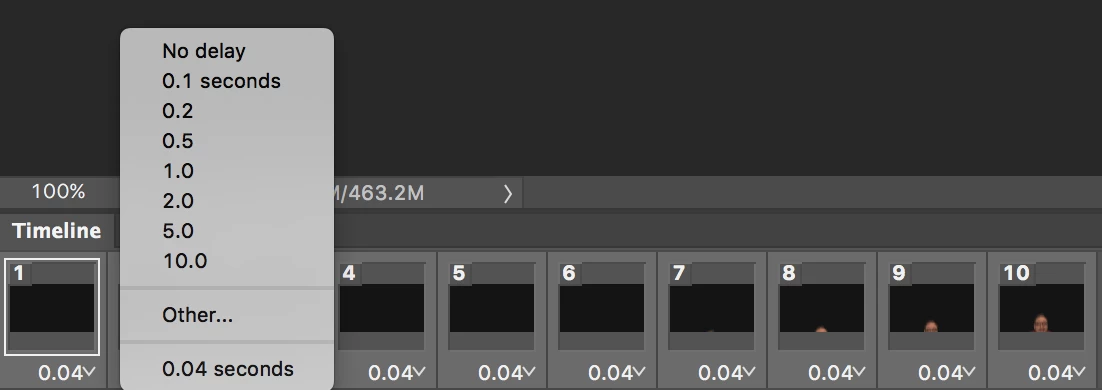
I'm creating an animated .gif from a video file. Importing the "video frames to layers" in motion workspace.   My issue is changing the speed. If I want to speed up the video for the final .gif, how does this happen?   I've been changing speed by selecting all the frames and using the drop down menu in the timeline.  Right now it's at .04 and it's really slow. I tried .004 and it doesn't change it. Seems like any number I input or select doesn't make a change (unless I want it slower).  Any insight?
    This topic has been closed for replies.

    4 replies

    dariam41684218
    Participant
    April 12, 2016

    Thanks for your help everyone. Moving forward!

    Trevor.Dennis
    Community Expert
    Community Expert
    April 11, 2016

    You'll be lucky to get better than 10FPS, so just set it to zero.  I convert to a video Timeline and render out to video if I need more speed.  You can add sound that way as well, but you can't make it loop forever with video.  I give the Timeline about four loops or about thirty seconds.  Any more than that and you lose your audience.

    JJMack
    Community Expert
    Community Expert
    April 11, 2016

    To add to what Silkrooster write with MP4 and Html5  Yoye win had cetter color and have audio and with HTML 5  you cak autoplay it look it and control speed. HTML5 Video

    JJMack
    Trevor.Dennis
    Community Expert
    Community Expert
    April 11, 2016

    JJMack wrote:

    To add to what Silkrooster write with MP4 and Html5  Yoye win had cetter color and have audio and with HTML 5  you cak autoplay it look it and control speed. HTML5 Video

    That's interesting JJ.  Is that the sort of output you'd get with CC Animate?  I'm guessing maybe not, as that used to be called Flash.

    BTW  I think you have stolen my crown as the typo king.

    Silkrooster
    Legend
    April 11, 2016

    I haven't played with CC animate in quite awhile, but to my understanding, it uses mp4 now that it is moving towards html5 instead of the flash plugin.

    However because of JavaScript, it is feasible to use a standard browser supported image format and get full speed. But it requires coding and knowledge of the animation features. Before html5, animation speed had the same limit that animated gif files had. But because of the demand for more speed for creating games, etc. New JavaScript commands were created that bypass that limit.

    I assume those limits were bypassed in css tags as well, but I am not sure.

    The last paragraph is generic in that it doesn't pertain to just animate CC. As JavaScript can be written with a text editor.

    Silkrooster
    Legend
    April 11, 2016

    Gif files are at the mercy of web browsers. They determine the the top speed for a gif.

    I recommend that you use a video format if you need it faster.