Participant
August 8, 2023
Answered

Speichern

  • August 8, 2023
  • 2 replies
  • 402 views

Hello!

I have decided to switch from PSE to the ABO of PS.
On the whole I can manage, but for a few really simple settings I can't find a solution.


Maybe someone can help me here?

When I have edited my RAWs, I always want to save them as jpg. Where and how can I make the setting so that I don`t get the message every time again that PS wants to save the image in psd format?

Similarly, when I close the edited photo, I am asked each time: Do you want to save the changes to the Adobe Photoshop document "DSCxyz.RAF" before closing? - NO, I NEVER want to do that. Is there anywhere to set this?

Thanks a lot !
More questions later for sure


Hallo!

Ich habe mich entschlossen von PSE auf das ABO von PS umzusteigen.
Im Großen und Ganzen komme ich damit zurecht, aber für ein paar wirklich simple Einstellungen finde ich keine Lösung


Vielleicht kann mir hier jemand helfen?

Wenn ich meine RAW`s bearbeitet habe, so möchte ich sie immer als jpg speichern. Wo und wie kann ich die Einstellung vornehmen, damit ich nicht jedes Mal erneut angezeigt bekomme, dass PS das Bild im psd Format speichern will?

Ganz ähnlich werde ich beim Schließen des bearbeiteten Fotos jedes Mal gefragt: Möchtest du die Änderungen an dem Adobe Photoshop-Dokument „DSCxyz.RAF“ vor dem Schließen speichern? - NEIN, das möchte ich NIE. Kann man das irgend wo festlegen?

Erstmal vielen Dank !
Weitere Fragen bestimmt später


This topic has been closed for replies.
Correct answer AxelMatt

Vielen Dank!

Ich hatte noch eine alte Version von PS, da konnte man in den Voreinstellungen auswählen in welchem Format man die Fotos speichert. Welche Nachteile das mit sich bringt ist mir durchaus bewußt, aber in meinem Fall spare ich dadurch eben paar Klicks.

Nicht immer ist alles Neue auch besser. 😳


Ich habe meine Kamera auf sRGB Fotos eingestellt und auch PS soll mit sRGB arbeiten, trotzdem werde ich bei jedem Import immer wieder gefragt wie ich die Fotos importieren will - da muss auch noch irgend etwas falsch eingestellt sein.


quote

...

Ich habe meine Kamera auf sRGB Fotos eingestellt und auch PS soll mit sRGB arbeiten,

...


By @Lutz31220509cjkg


Wenn du mit RAW-Dateien arbeitest ist diese Einstellung mehr oder weniger irrelevant. Das hat nur Einfluss auf das eingebettete JPEG welches als Vorschaubild z.B. in Lightroom angezeigt wird.


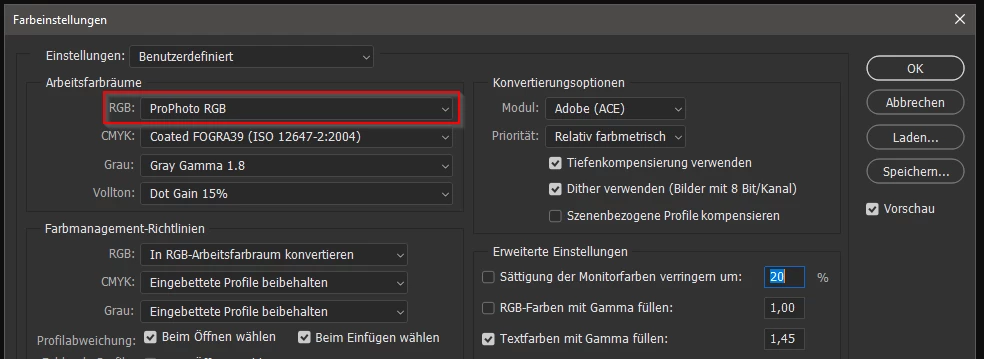
Schau mal in den Farbeinstellungen nach was da eingestellt ist. Wähle bei RGB mal "ProPhoto RGB" (oder auch Adobe RGB (1998) ) aus. Das ist ein erweiterter Farbraum der auch für RAW-Dateien passt.

Ich arbeite mit diesen Einstellungen.


2 replies

davescm
Community Expert
Community Expert
August 8, 2023

Hi

Photoshop will always put PSD first on the list as this will preserve all of the edits in your file e.g. layers , channels , paths , 16 bits/channel etc


Usually the recommendation is to save in such a format PSD/PSB/TIFF then export a copy to jpeg, if a jpeg is required. The reason being that jpeg uses lossy compression , therefore re-editing is not advisable. PSD uses lossless compression so saving and reopening restores the previous state without change. 


If you make any change to a file you will always be offered the chance to save before closing. This would again give you PSD/TIFF etc The actual raw file is never overwritten. If you made any edits in camera raw you will see an XMP file stored alongside the raw file. That contains the raw edits as a list.


Dave

Participant
August 9, 2023

Ich behalte grundsätzlich meine RAW Dateien. Aber ich möchte nicht jedesmal gefragt werden, ob ich die Veränderungen in RAW speichern möchte.

Außerdem möchte ich selbst festlegen welches Speicherformat bei mir Vorrang hat.


I always keep my RAW files. But I don't want to be asked every time if I want to save the changes in RAW.

Also, I want to decide for myself which save format takes priority for me.

AxelMatt
Community Expert
Community Expert
August 9, 2023

Dateien in Photosshop werden standardmäßig immer im PSD - Format gespeichert. Das lässt sich auch in den Voreinstellungen nicht ändern. Wenn man ein JPEG haben will muss man das expliziet die Datei als JPEG exportieren. 

Das macht auch Sinn. Das PSD-Format speichert alle Ebenen, Kanäle usw. und so kann man später noch entsprechende Änderungen vornehmen. Bei der Speicherung im JPEG Format gehen diese verloren und lassen sich auch nicht wieder herstellen um entsprechende Anpassungen vorzunehmen. Da helfen auch die gesicherten RAW-Dateien nicht weiter. Die entsprechenden Bearbeitungen werden nicht in die RAW-Dateien geschrieben.


My System: Intel i7-8700K - 64GB RAM - NVidia Geforce RTX 3060 - Windows 11 Pro 25H2 -- LR-Classic 15 - Photoshop 27 - Nik Collection 8 - PureRAW 6 - Topaz Photo AI
Sameer K
Community Manager
Community Manager
August 8, 2023

Hey @Lutz31220509cjkg! Welcome to the Photoshop Community. I'll help you figure this out.


This will take some time to get used to. To save JPEGs out of your RAW edits, you can use File > Export > Quick Export As JPEG to send output. You can set the Quick export settings in Preferences > Export.


You can read more about the current save workflow in Photoshop here: https://helpx.adobe.com/photoshop/using/saving-images.html#export-layers-to-files


Thanks!
Sameer K