
Participant
August 26, 2017
Answered

Spot healing brush leaves ghosts

  • August 26, 2017
  • 3 replies
  • 3379 views

I am running the 2017.1.1 release of Photoshop and have no issues until yesterday afternoon.

I was working with an image that I was editing that I started in Lightroom.  I was removing a sign from a street scene with the spot healing brush. 

After having removed it, there was a short of the sign.  I tried to remove something else from the image and it left a tan colored remnant of what I had attempted to removed.

This morning I tried a different image, and a flag was left with the tan color and a sign was left with the red of the sign that I was attempting to remove as a ghost of the original sign.

I have looked around on the support site and cannot find anything that would seem to be similar to what it is that I am experiencing.  This worked fine up until yesterday afternoon.  I had been using it yesterday morning, so somewhere between a few images, something went a bit out of line.   Closing both applications, a reboot of the system (Mac Sierra 10.12.6) has not resolved anything either.  (Only 1 year in the Mac world, came from Windows platform)
This topic has been closed for replies.
Correct answer gener7

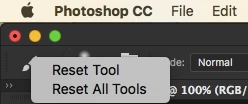
Sometimes settings are knocked off, and the best way is to reset the tool by right clicking on its icon in the Option bar and try again.

3 replies

trentreker
Participant
December 18, 2022

as keith wrote above, this is STILL happening.  i'm running 2023 programs from adobe and it's happening.  how can i say this without cursing. . . the latest version is a neverending series of inoperable tools, lame popups telling me crap i already know (oops, touched a smart object while set on eyedropper!  forgive me, o' master adobe!), jerky scrolling that'll suddenly lead me OFF the file, and ceaseless workflow disruptions. 


i've got a brand new macbook 14 with m1 pro chip and 16 gigs of memory.  it's like i'm on a five year old windows machine.  so very tired of the incompetence at adobe.

ilinas64965902
Participant
April 28, 2021

Resetting the tool didn't work for me. I'm on Windows, current CC.

Keith23242116exw5
Known Participant
July 5, 2022

Most of this thread is 4 or 5 years old. Im running version 11.4.1 of LRC in July 2022 and having the same ghosting issues - but not always. Right clicking on the spot removal tool doesn't give any drop down options. Does anyone have a fix please?

gener7
Community Expert
gener7Community ExpertCorrect answer
Community Expert
August 26, 2017

Sometimes settings are knocked off, and the best way is to reset the tool by right clicking on its icon in the Option bar and try again.

RadkomanAuthor
Participant
August 29, 2017

After a few false takes I finally found the reset and that fixed it.

Thanks!

David