

bartonlew
Legend
June 17, 2018
Answered

spot healing brush not working on extended canvas area

  • June 17, 2018
  • 2 replies
  • 1101 views

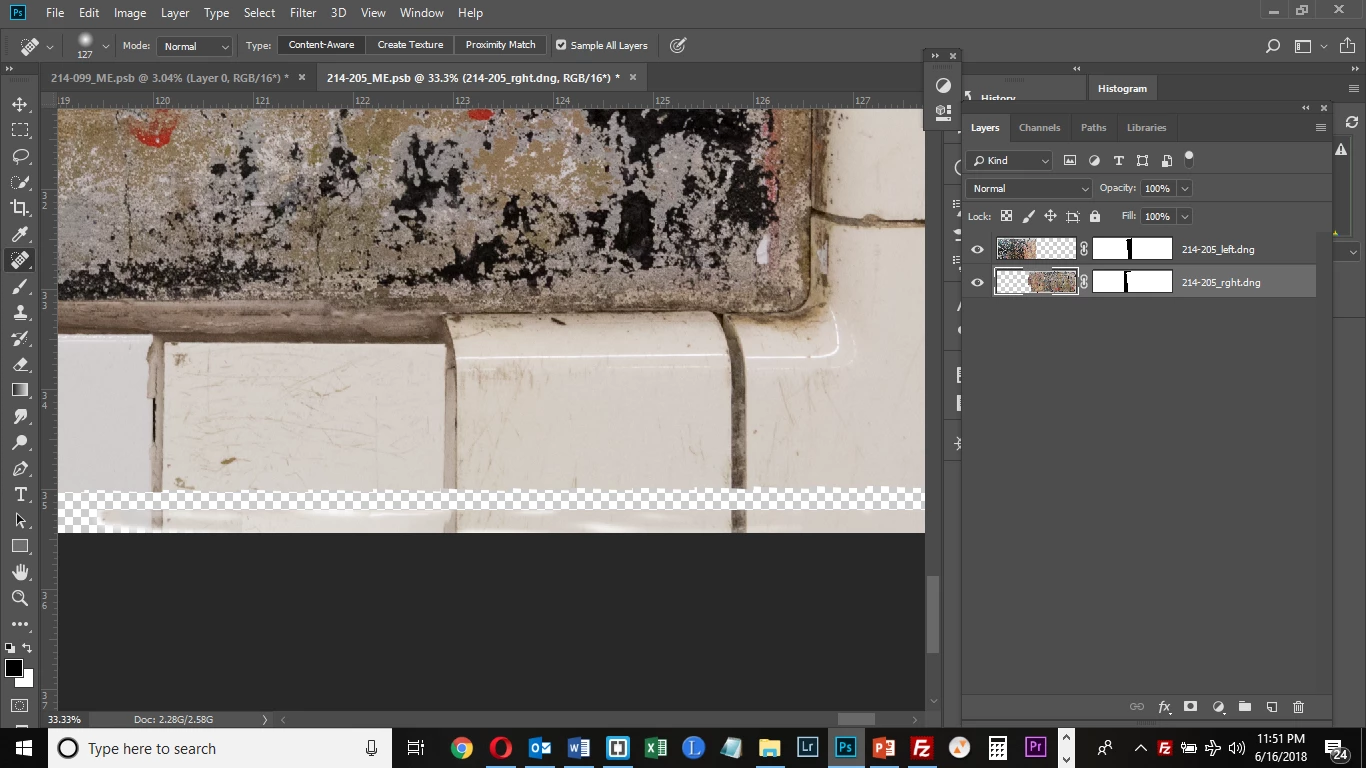
I continue to have problems with layers and various tools.  Here, I am just trying to use the Spot Healing Brush to fill in the bottom tile area of the image shown.  But it leaves a gap between where the image ends and where I have cropped to extend the canvas downwards, filling in the bottom canvas edge but for some reason not the area in between.  Is there an obvious reason for this?
This topic has been closed for replies.
Correct answer c.pfaffenbichler

I guess you are using the wrong tool for the task.

Why don’t you start with a Content Aware Fill or a Content Aware Crop?

Otherwise use the Clone Stamp Tool or the Healing Brush Tool.

Edit: Though another issue seems possible – Could there be a black bar in the Layer Mask at that position (which might be to thin to be noticeable in the Layer Mask icon)?

2 replies

c.pfaffenbichler
Community Expert
Community Expert
June 17, 2018

Quotes from the reference:

The Spot Healing Brush tool removes blemishes and objects.

The Spot Healing Brush tool quickly removes blemishes and other imperfections in your photos. The Spot Healing Brush works similarly to the Healing Brush: it paints with sampled pixels from an image or pattern and matches the texture, lighting, transparency, and shading of the sampled pixels to the pixels being healed. Unlike the Healing Brush, the Spot Healing Brush doesn’t require you to specify a sample spot. The Spot Healing Brush automatically samples from around the retouched area.

So creating new pixels on empty Layer Space does not exactly seem like what it is intended for. (edited)

bartonlew
bartonlewAuthor
Legend
June 18, 2018

While I believe that technically you are correct, I have long used the spot healing brush to create content where there is none as well as to correct problem areas using content aware.  But I believe my problem was that I needed to reset my preferences to their default setting.  I was getting strange behavior with various tools until I did this.  Still, I will give the healing brush a try for creating content where there is none.  Thank you.

c.pfaffenbichler
Community Expert
c.pfaffenbichlerCommunity ExpertCorrect answer
Community Expert
June 17, 2018

I guess you are using the wrong tool for the task.

Why don’t you start with a Content Aware Fill or a Content Aware Crop?

Otherwise use the Clone Stamp Tool or the Healing Brush Tool.

Edit: Though another issue seems possible – Could there be a black bar in the Layer Mask at that position (which might be to thin to be noticeable in the Layer Mask icon)?