
marlainap16272335
Participant
May 2, 2017
Answered

Squished photo

  • May 2, 2017
  • 2 replies
  • 2794 views

I edited about twenty photos and sent them off to school prints. On their website to get the pictures to fit correctly I had to resize the images to 8x10 here on photoshop cc 2015. Now all my images are squished looking. The pixel ratio is set to square. What else can I do? Is there anyway to undue the resize this late in the game after its already been saved. thanks
    This topic has been closed for replies.
    Correct answer Nancy OShea

    I hope you didn't save over your originals!! 

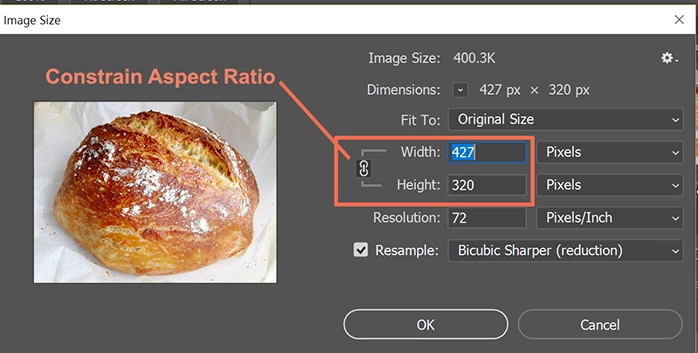
    When you resize images for the web, always make sure to constrain the aspect ratio.  Or else,  you get grossly distorted results.   See screenshot. 

    Now the website may have their own ideas about height and width.  If unsure, check with site's webmaster or administrator to find out exactly what height & width in pixels you need to use.

    If the site uses square images, you'll need to use Crop tool to find the best fit.

    Nancy

    2 replies

    Silkrooster
    Legend
    May 5, 2017

    Don't set the ratio to square, unless the original is square 1:1 or you do a crop first to make it square.

    Nancy OShea
    Community Expert
    Nancy OSheaCommunity ExpertCorrect answer
    Community Expert
    May 2, 2017

    I hope you didn't save over your originals!! 

    When you resize images for the web, always make sure to constrain the aspect ratio.  Or else,  you get grossly distorted results.   See screenshot. 

    Now the website may have their own ideas about height and width.  If unsure, check with site's webmaster or administrator to find out exactly what height & width in pixels you need to use.

    If the site uses square images, you'll need to use Crop tool to find the best fit.

    Nancy

    Nancy O'Shea— Product User & Community Expert