AichaB
Known Participant
December 25, 2019
Answered

Sript for deleting path

  • December 25, 2019
  • 4 replies
  • 1445 views

Hi,

I'm using Photoshop CC2019 and I my images usually end up with multiple path layers, but my final images should be a tiff images having only one layer path named as "Path 1".

I tried so hard to do it using actions by deleating all path layers and leaving only "Path 1" layer path but it seems impossible and the only way to do it is really by scripts 😞 ! if anyone can help it would be very appreciated !

This topic has been closed for replies.
Correct answer Chuck Uebele

Thanks for the tips. I am a complete beginner, so please pardon the following very basic question. 


I have pasted the code in text/edit, but it will not let me save as a .jsx file. Only an .rtf file. I have removed the .rtf and replaced it with .jsx. I then paste the file in the scripts section within the library, and I can see it pop up when I browse for it under the scripts menu. But I keep recieving this error:  
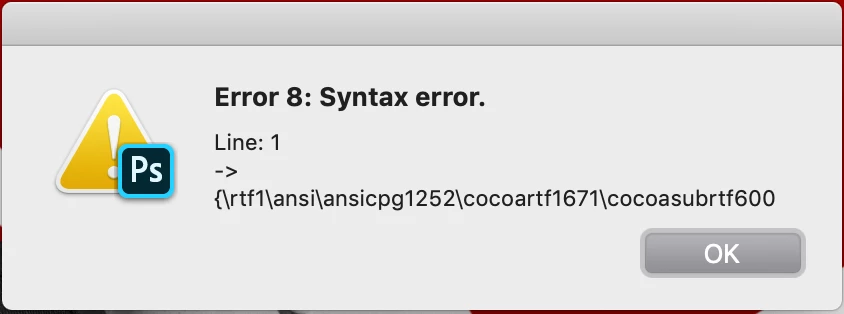
 

Error 8: Syntax Error


I noticed that even though the file has the .jsx extension, the I con on the file remains as a white piece of paper, where all of the other files have an icon labeled "exec", and is green and black. What am I missing here? 


You need to use a plain text editor. You can download Extendscript Took Kit from the Adobe Creative Cloud App (same place you download/update Photoshop). Or you can you something like notepad or word pad. Just no rtf format - straight txt extension that you can change to jsx.

4 replies

stevenb62851698
Participant
January 27, 2020

Hi Chuck. I am well versed in actions, but new to scripting. I am also looking for a way to delete paths via scripting. I have a couple of questions based on your earlier response, and I'm hoping you can help!


1. Is the above code in Java? Would I save a jsx file and place it in the "Scripts" folder in the system Library?

2.Instead of deleteing "Path 1", would it be possible to delete all paths? In case the path doesnt have a specific name that matches the code? 

3. Could this script be run in a batch? 


Thank you! 

Chuck Uebele
Community Expert
Community Expert
January 28, 2020

It is a form of javascript. You can remove all the paths:

activeDocument.pathItems.removeAll();

AichaB
AichaBAuthor
Known Participant
December 25, 2019

It's working !!!! thank you so much !!

Chuck Uebele
Community Expert
Community Expert
December 25, 2019

Try this:

#target photoshop
var doc = activeDocument;
var pLen = doc.pathItems.length
var pArray = [];
for(var i=0;i<pLen;i++){
    pArray.push(doc.pathItems[i].name)
    }
for(var i=0;i<pLen;i++){
    var curPath = doc.pathItems.getByName (pArray[i]);
    if(curPath.name !='Path 1'){curPath.remove()}
    }
JJMack
Community Expert
Community Expert
December 25, 2019

Can you describe the problem you have scripting the process. Post your script code so we can try to help improve on it.  I think there should be no problem using DOM code to script that process. Adobe Photoshop CC javascript reference. 

JJMack
AichaB
AichaBAuthor
Known Participant
December 25, 2019

Well, what I want to do is just deleting all path layers (Work Path, Path 2, object, ....) that I could have depending on what I did on the image, exept from "Path 1" layer that I always need to keep in the image.

Thank you !!!