Inspiring
May 29, 2019
Answered

Start Schrift in asiatisch und englisch statt deutsch

  • May 29, 2019
  • 3 replies
  • 710 views

Hallo,

plötzlich ist das Start-Dialog-Fenster teilweise in asiatischer und englischer Schrift, anstatt in deutscher. Das betrifft allerdings nur den Anfang, siehe Screenshot.

Habe bereits verschiedene "basic troubleshooting steps" von Adobe durch - ohne Erfolg.

Letzte auffällige Aktionen:

1) sehr große Datei geöffnet > 1,7 GB

2) Hintergrundaktualisierung von XD

Mein System: iMac Pro, 64 GB RAM, alles sehr neu usw.

Any Ideas?

Danke,

Andros
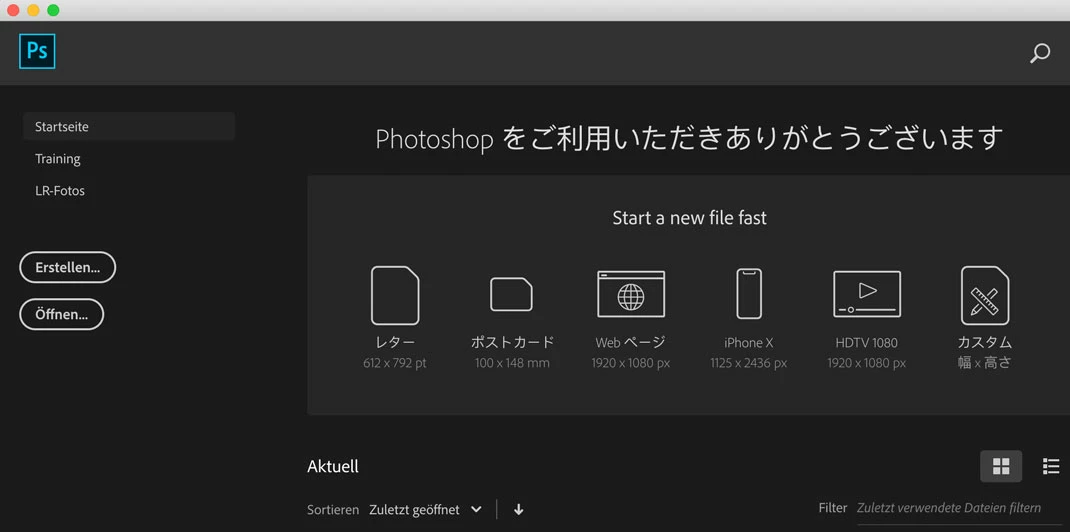
This topic has been closed for replies.
Correct answer Catworker

Well, I've been for a couple of days on vacation, came back, started my Mac, switched to dark mode because I felt it would be nice, opened PSD - everything is fine now. The language is not Japanese anymore. Don't know if switching in the dark mode or the time of some days leaving the Mac shut down (cache problem?) is the reason. Root cause by Apple or Adobe?

*confused* but happy.

3 replies

CatworkerAuthorCorrect answer
Inspiring
June 6, 2019

Well, I've been for a couple of days on vacation, came back, started my Mac, switched to dark mode because I felt it would be nice, opened PSD - everything is fine now. The language is not Japanese anymore. Don't know if switching in the dark mode or the time of some days leaving the Mac shut down (cache problem?) is the reason. Root cause by Apple or Adobe?

*confused* but happy.

c.pfaffenbichler
Community Expert
Community Expert
May 29, 2019

Habe bereits verschiedene "basic troubleshooting steps" von Adobe durch - ohne Erfolg.

Did that include restoring the Preferences?

CatworkerAuthor
Inspiring
May 29, 2019

you mean putting Adobe Photoshop CC 2019 Prefs.psp to the trash? yes, that is, what I did, too.

c.pfaffenbichler
Community Expert
Community Expert
May 29, 2019
you mean putting Adobe Photoshop CC 2019 Prefs.psp to the trash?

No, I meant a proper resetting of the Preferences.

https://helpx.adobe.com/photoshop/kb/basic-trouble-shooting-steps.html

May 29, 2019