

'Sticky' clone tool won't let go once I click 'alt'
Hi! I hope someone can help as I've exhausted all avenues...
Firstly, this error is occuring in all versions of photoshop now despite re-installing, reverting to older versions etc..
I've tried this with a single layer jpg so that layers are not complicationg this:
I select the clone tool and hold down Alt, then as soon as I click on the image to define an area, it 'sticks' to the image, acts like its made a new layer which moves around on top of the original one.
I haven't made any changes to my system set up.
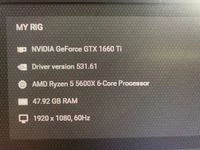
I'm on Windows 11,
Plenty of RAM,
Graphics processor is checked in preferences,
Plenty of room on scratch disks
Drivers are up to date,
Does the same thing with wired or wireless mouse as well as Wacome Intuos.
I'm completely stumped!
If anyone can help I'll send you my firstborn. Thanks in advance.
 AdChoices