Known Participant
May 13, 2018
Answered

Stop Canvas Rotation when using Wacom Intuos 5 Tablet

  • May 13, 2018
  • 4 replies
  • 9495 views

I am still getting used to using my Wacom Tablet with PhotoShop. The BIGGEST annoyance is when the canvas rotates when every I rest my hand on the tablet while using the stylus. It usually happens while I am using a brush or clone stamp. It drives me INSANE that I cannot simply lock the rotation. Any assistance would be greatly appreciated. I am not touching any keys, it is happening when I apply pressure with my writing hand.
This topic has been closed for replies.
Correct answer davescm

Hi

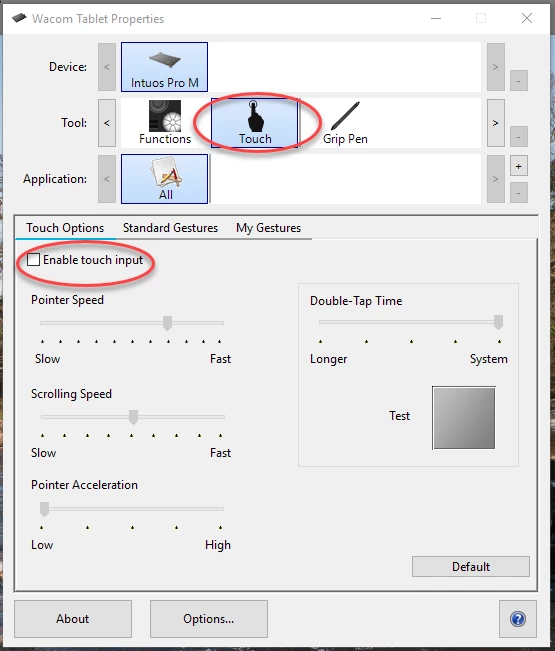
On the Intuos Pro I just disable touch input in the tablet properties

Dave

4 replies

Participant
February 15, 2024

same issue - what an annoyance. two minutes of using it and you know this is a total pain. If people just used their own product.

Jueine Loo
Participant
July 27, 2021

Go to Photoshop -> Preferences -> Tools --> Remove the tick at "Enable gesture"

It works for me


Participating Frequently
October 13, 2020

I'm having the same problem  I have the Wacom Intuos Pro; however my tablet properties do NOT have the checkbox for Enable Touch Input.  I don't know how to stop my canvas from rotating intermittently when I'm using the pen tool.


Participant
March 6, 2021

Jeanf


I have the same issue with the canvas rotation while using the pen tool. This has driven me insane. I waste so much time. I have searched online for an answer. I also do not have the checkbox for Enable Touch Input. I have the Wacom Intuos Pro as well. Has anyone found a solution to this yet?

davescm
Community Expert
Community Expert
March 6, 2021

What Wacom driver are you using ?

This is 6.3.42-2

Dave

davescm
Community Expert
davescmCommunity ExpertCorrect answer
Community Expert
May 13, 2018

Hi

On the Intuos Pro I just disable touch input in the tablet properties

Dave

Known Participant
May 13, 2018

Thanks Dave, I'll try that.