toweb_noel
Participant
November 7, 2017
Answered

stop photoshop restoring files on startup

  • November 7, 2017
  • 2 replies
  • 5494 views

Is there an option to stop photoshop restoring files on startup?

This topic has been closed for replies.
Correct answer D Fosse

so there is no option not to save recovery files?
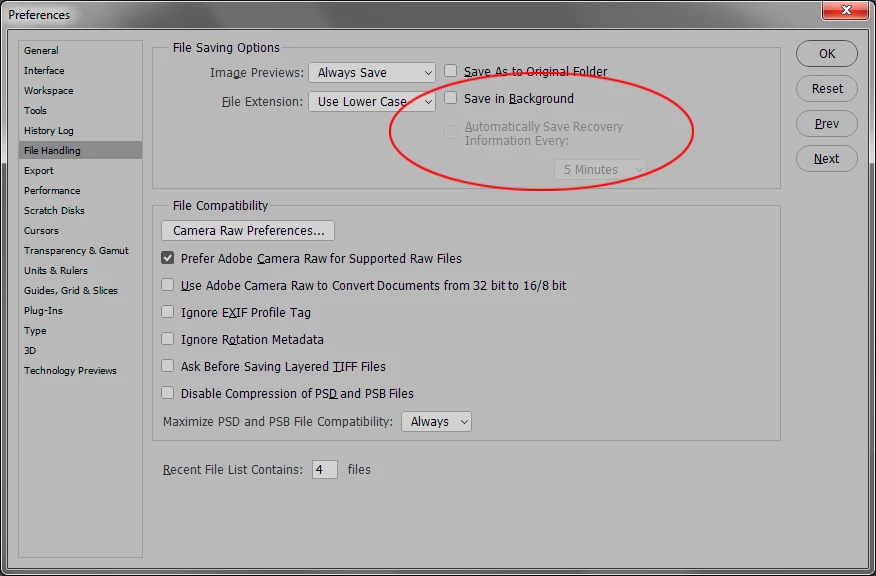

...but I would still recommend you try to figure out why Photoshop isn't shutting down properly.

2 replies

D Fosse
Community Expert
Community Expert
November 7, 2017

What this means is that Photoshop does not exit correctly - or to put it simply, it closes with a crash. That's what your problem is, and what you need to sort out, not the recovery files. These will be deleted in a proper shutdown and not come up again.

JJMack
Community Expert
Community Expert
November 7, 2017

Delete them a close all no save should delete the recovery files.  Then stop and start Photoshop. There should be no recovery files. Photoshop should not open any recovery files.  You may also want to change your preferences not to save recovery files.

JJMack
toweb_noel
Participant
November 7, 2017

JJMack​ Where can I set this option?

JJMack  schrieb

Delete them a close all no save should delete the recovery files.  Then stop and start Photoshop. There should be no recovery files. Photoshop should not open any recovery files.  You may also want to change your preferences not to save recovery files.

JJMack
Community Expert
Community Expert
November 8, 2017

JJMack