
Participant
November 18, 2021
Answered

Straighten Action That Only Exists in Elements

  • November 18, 2021
  • 2 replies
  • 452 views

Hi guys,


I have found a series of actions in elements that I need, but one of the steps (Image>rotate>straighten image) doesn't exist in photoshop. I need to apply this action set to thousands of photos every month. I tried to find out how to convert an atn file to xml to edit it manually for use in elements, but this doesn't seem to work on the latest versions, and it also appears that actions can't be batch applied in elements. 😞


1.  Is there a way to get photoshop to use this straighten function that exists in elements?

2. Is there a way to use scripts in elements to batch edit a folder of images with a set of actions?
This topic has been closed for replies.
Correct answer Jeff Arola

What version of photoshop elements and operating system are you using?


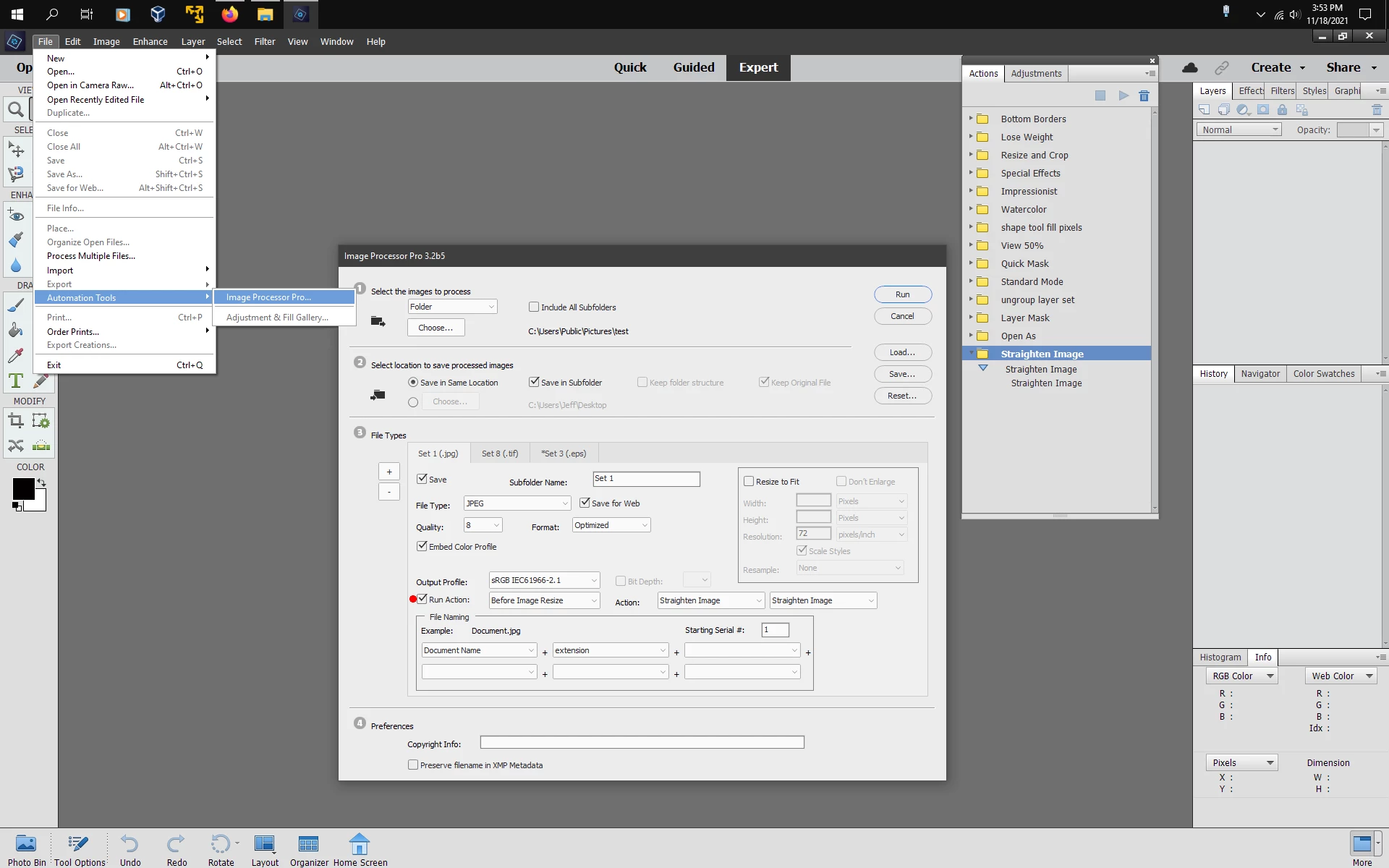
It can be done if your using a newer version of photoshop elements.


You need the Staighten Image action from here:

https://assets.adobe.com/public/e3754f7a-82d6-4d80-6cbd-6f444618aeab


As well as the Image Processor Pro script from here:

(goes in C:\Program Files\Adobe\Photoshop Elements Your Version\Presets\Scripts)

https://sourceforge.net/projects/ps-scripts/files/Image%20Processor%20Pro/v3_2%20betas/


https://shared-assets.adobe.com/link/e3754f7a-82d6-4d80-6cbd-6f444618aeab


https://shared-assets.adobe.com/link/e3754f7a-82d6-4d80-6cbd-6f444618aeab

https://shared-assets.adobe.com/link/e3754f7a-82d6-4d80-6cbd-6f444618aeab


2 replies

Bojan Živković11378569
Community Expert
Community Expert
November 19, 2021

"Is there a way to get photoshop to use this straighten function that exists in elements?"


Action can not be used as it is recorded, there isn't Straighten Image menu item in Photoshop.

Jeff Arola
Community Expert
Jeff ArolaCommunity ExpertCorrect answer
Community Expert
November 18, 2021

What version of photoshop elements and operating system are you using?


It can be done if your using a newer version of photoshop elements.


You need the Staighten Image action from here:

https://assets.adobe.com/public/e3754f7a-82d6-4d80-6cbd-6f444618aeab


As well as the Image Processor Pro script from here:

(goes in C:\Program Files\Adobe\Photoshop Elements Your Version\Presets\Scripts)

https://sourceforge.net/projects/ps-scripts/files/Image%20Processor%20Pro/v3_2%20betas/


https://shared-assets.adobe.com/link/e3754f7a-82d6-4d80-6cbd-6f444618aeab


https://shared-assets.adobe.com/link/e3754f7a-82d6-4d80-6cbd-6f444618aeab

https://shared-assets.adobe.com/link/e3754f7a-82d6-4d80-6cbd-6f444618aeab


Participant
November 18, 2021

Hi Jeff,

I'm using photoshop elements 2022 (windows)

Automation tools is grayed out for me.

Are you able to run a set of actions in that "image processor pro" ? I'm assuming the set still has to be recorded in regular photoshop and then imported to elements, so how to use the straighten action in addition?