poeda
Participant
October 28, 2018
Question

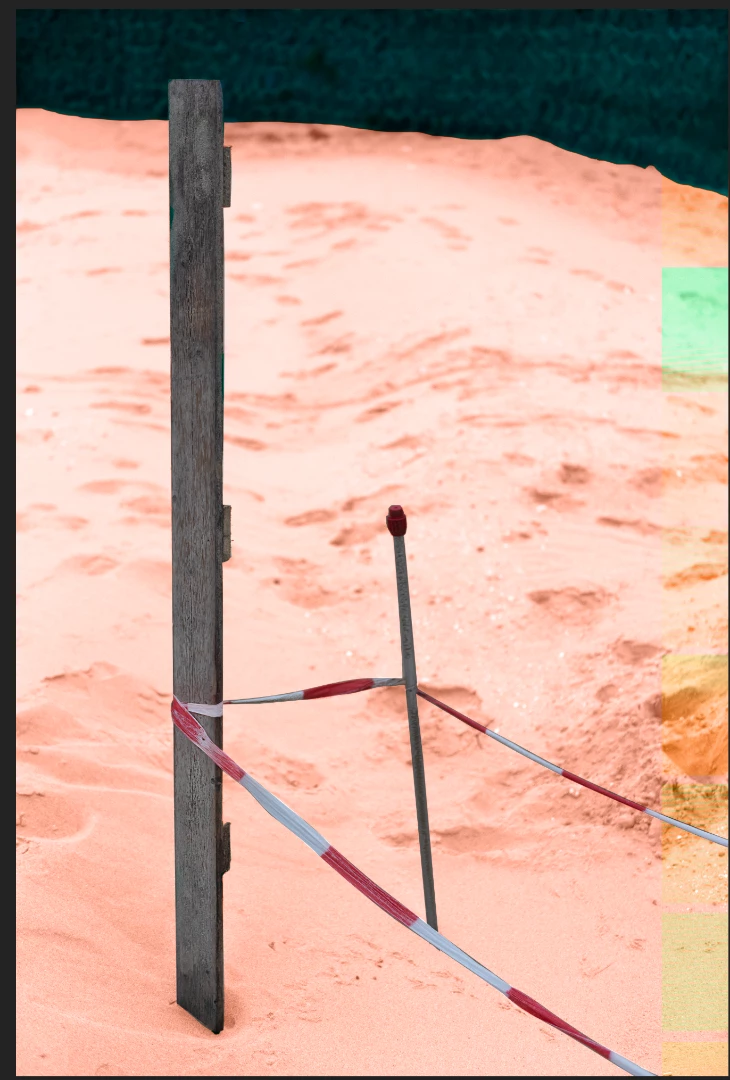
Strange color blocks when setting as smart object or image/ apply image

  • October 28, 2018
  • 2 replies
  • 399 views

Have PS 20.0 instyalled on a Mac (High Sierra). When I have a couple of layers and want to do an Image/ Apply Image or when I group those layers and want to turn them into a Smart Object, I get these strange colored blocks on the right hand side that I can't get rid of. Help is most welcome. Thanks, Nick.
This topic has been closed for replies.

2 replies

JJMack
Community Expert
Community Expert
October 28, 2018

Try turning off GPU support in you Photoshop Preferences Performance settings.  I doe not test  Apply image one my Windows 10 machine but I did try coveting several layer into a smart object layer I saw no problems and the Object opens into Photoshop as a work document which contains the layers I used to create the smart object layer.   It may be you Mac display Adapter device driver.

JJMack
October 28, 2018

Hi

Try enabling this option in preferences and restarting Photoshop to see if it helps