Answered
Strange square
I got a small white square I can't get rid of. I can't even clone it away. Anybody know how to get rid of it?
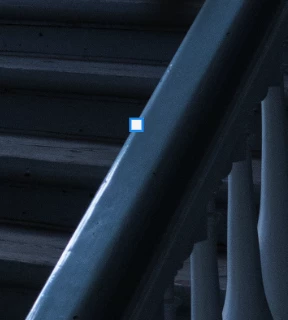
I got a small white square I can't get rid of. I can't even clone it away. Anybody know how to get rid of it?
Add a new layer directly above the background. Use the clone tool but set the sample (in the options bar) to 'current and below'. Then clone out the square on the new empty layer.
Dave
No, it's not working - and I tried remove tool and generative fill ... nothing.
But now I copied the image into a new file - and that worked ..!
Thanks for your answers Dave.
Already have an account? Login
Enter your E-mail address. We'll send you an e-mail with instructions to reset your password.
 AdChoices