ViktoriaPS
Participant
March 8, 2019
Answered

Stroke in Layer style with opacity 0%

  • March 8, 2019
  • 3 replies
  • 2816 views

Hi,

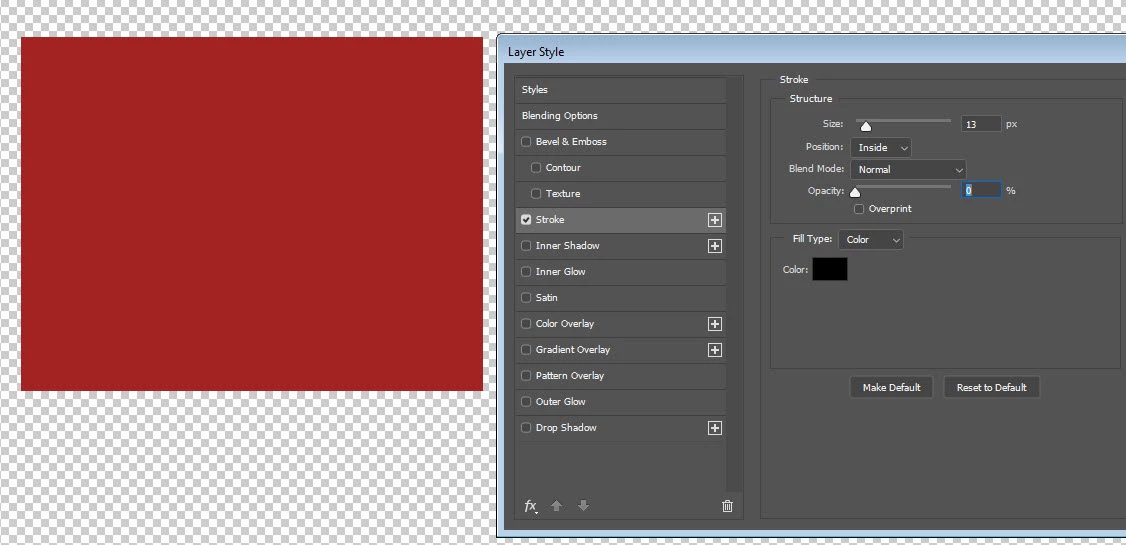
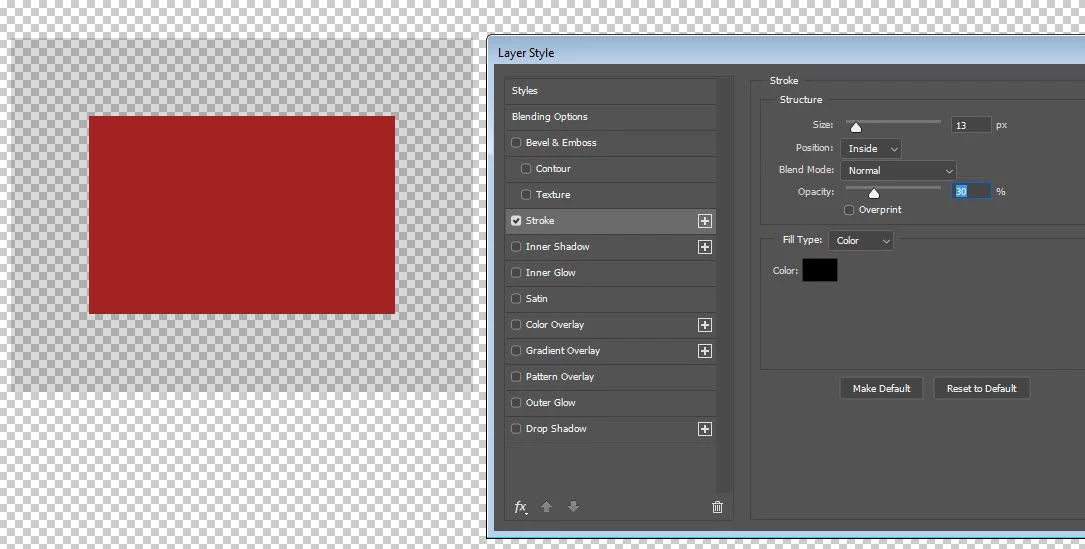
I updated to the latest PS CC 2019 and noticed that Stroke in Layer style with 0% opacity works differently than with earlier versions (PS 2014)

When I decrease opacity to 0%, the stroke effect now disappears completely and the object becomes solid without any stroke, while the old PS makes an object transparent where the stroke is applied. I used to use this effect much if I need to decrease the object for several pixels inside.

Probably, some option I should turn on? Overprint is not it, I tried.
This topic has been closed for replies.
Correct answer davescm

Hi

That is helpful and I can confirm I can replicate that here on Windows (so not a Mojave issue) . Victoria - sorry I had misread your post and had not caught the significance of the change between 1% and 0%.

Looks like a bug to me

I've raised a bug report - you may wish to add your own comments

CC2019 V20.0.3 Layer style stroke issue | Photoshop Family Customer Community

Dave

3 replies

JJMack
Community Expert
Community Expert
March 8, 2019

Yes I see that in CC 2018 and CC 2019 not in CS6 and CC 2014.   I have removed CC 2015, CC 2015.5 and CC 2017.  I forget in which release Adobe made the changes Photoshop Layer Style feature so multiple effects of the same kind can be applied. I would think that would be the release that change was made. 

JJMack
davescm
Community Expert
Community Expert
March 8, 2019

Hi JJ - that is interesting. I don't see the issue (i.e the significant change between 1% and 0%)  in CC2018  but I do in the current CC2019 (V20.0.3)

Edit : I must have tested incorrectly, the issue is in CC2018 also

Dave

JJMack
Community Expert
Community Expert
March 8, 2019

I forget in which release Adobe made the changes Photoshop Layer Style feature so multiple effects of the same kind can be applied. I would think that would be the release that change was made.  It may not be an issue in Adobe mind set it may be just an other incompatible design change. A new feature. Than again it may be a bug for it only happens when there is just a single stroke effect like the Append shows. Adobe would think its acceptable though.

JJMack
Michael Bullo
Community Expert
Community Expert
March 8, 2019

I have the same issue. As I lower the opacity of the inside stroke it cuts into the object and does so all the way down to 1%. As soon as it gets to 0% the influence of the stroke disappears entirely and the entire object is revealed.

macOS Mojave Version 10.14.3

Photoshop Version 20.0.3

davescm
Community Expert
davescmCommunity ExpertCorrect answer
Community Expert
March 8, 2019

Hi

That is helpful and I can confirm I can replicate that here on Windows (so not a Mojave issue) . Victoria - sorry I had misread your post and had not caught the significance of the change between 1% and 0%.

Looks like a bug to me

I've raised a bug report - you may wish to add your own comments

CC2019 V20.0.3 Layer style stroke issue | Photoshop Family Customer Community

Dave

ViktoriaPS
Participant
March 8, 2019

Thank you for a bug report.

Yes, Michael Bullo describes it perfectly. 1% is Ok, but when 0% stroke disappears.

davescm
Community Expert
Community Expert
March 8, 2019

Hi

I have to check overprint here to get CC2019 (v 20.0.3) to look like your second screenshot.

Without overprint it looks like your first screenshot.

Have you tried resetting your preferences ?

Dave