enricod3785659
Participating Frequently
September 8, 2018
Answered

Strumento pennello

  • September 8, 2018
  • 2 replies
  • 3046 views

Ho un problema con lo strumento pennello, quando lo applico è come se ci fosse inserita l'opacità

This topic has been closed for replies.
Correct answer

Hi

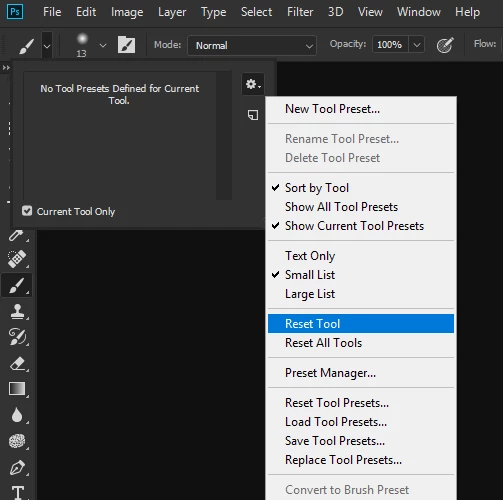
What version of Photoshop and OS do you have, have you tried resetting the Brush Tool
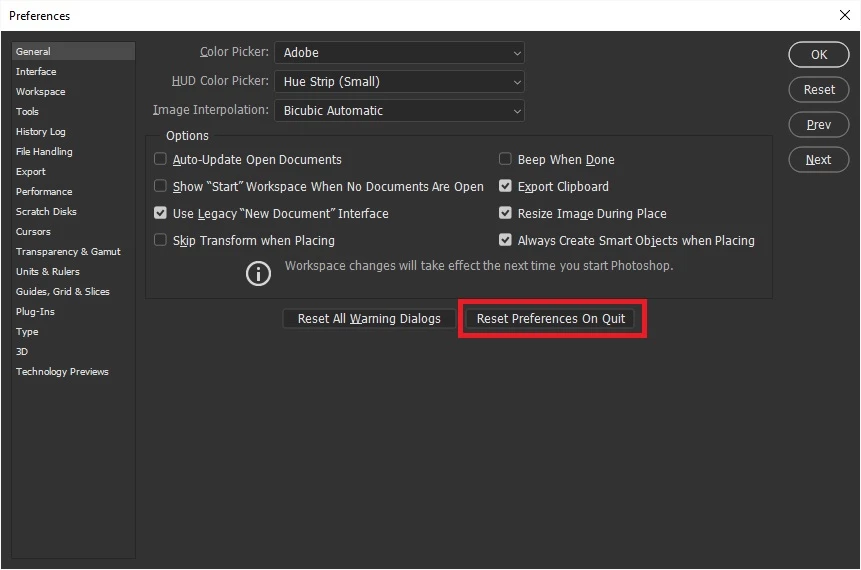
If that doesn't help try resetting Photoshop preferences
If non of the above helps can you please explain your issue in more detail, a screenshot with all the pertinent panels opened would help too

2 replies

cinziamarotta
Participating Frequently
September 8, 2018

Ciao,

nelle versioni 2017 e 2018 Photoshop ha cambiato il pannello Pennelli. In alto hai i pennelli recenti utilizzati anche con altri strumenti (per esempio Gomma o Brucia), puoi disattivare questa opzione di visualizzazione dalle impostazioni del pannello. Se selezioni uno dei pennelli recenti, PS ti reimposta le opzioni precedenti e il relativo strumento. Inoltre controlla anche le impostazioni di flusso del pennello:

enricod3785659
Participating Frequently
September 8, 2018

Pare che il problema sia risolto, altro problema, non sempre, è che quando apro una foto me la fa vedere solo sul navigatore e non quella grande, devo chiudere PS e riaprirlo e funziona tutto

Grazie

cinziamarotta
Participating Frequently
September 8, 2018

Cancella le preferenze di Photoshop: chiudi e rilancia il programma tenendo premuti i tasti ALT+CMD+MAIUS.

Se il problema persiste crea un altro POST nel forum con il nuovo argomento.

Correct answer
September 8, 2018

Hi

What version of Photoshop and OS do you have, have you tried resetting the Brush Tool

If that doesn't help try resetting Photoshop preferences

If non of the above helps can you please explain your issue in more detail, a screenshot with all the pertinent panels opened would help too