Mllejules
Participating Frequently
April 10, 2017
Answered

Stuck in centimetres, though preferences set for pixels

  • April 10, 2017
  • 1 reply
  • 599 views

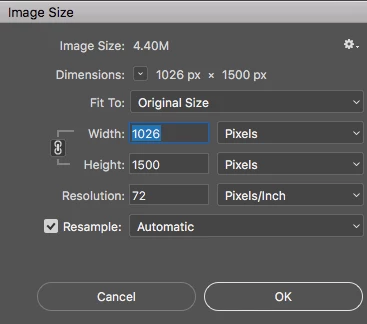
I'm on Mac OS Sierra running the latest 2017 Photoshop. I'm desperate to get the image resize dialogue box to default to pixels but it keeps showing centimetres as a default. I have changed this in every previous version of Photoshop I've used, and it's always worked the same way, by changing the units in my preferences. For this version I've done it multiple times, closing photoshop and reopening, and have restarted my mac, but I still see centimetres for the width and height inputs.

Is this a bug or am I missing something? This is seriously frustrating my workflow!
    This topic has been closed for replies.
    Correct answer gener7

    Change units in the Image Size Box, not the Preferences. It should stay there. CC 2017.1/OSX 10.12.4

    1 reply

    gener7
    Community Expert
    gener7Community ExpertCorrect answer
    Community Expert
    April 10, 2017

    Change units in the Image Size Box, not the Preferences. It should stay there. CC 2017.1/OSX 10.12.4

    Mllejules
    MllejulesAuthor
    Participating Frequently
    April 10, 2017

    Interesting. I've done as suggested. It has worked, but I thought I'd tried it lots of times before!

    Presumably I was pressing cancel instead of OK. Thanks!