
Daniel_s_Design
Known Participant
February 13, 2019
Question

swapping head from one image to another with same skin tone

  • February 13, 2019
  • 4 replies
  • 1957 views

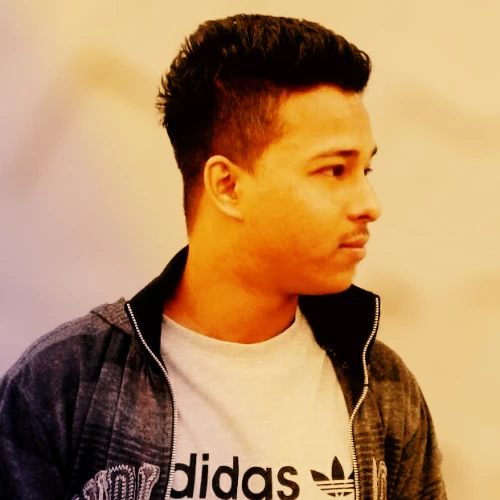
I got struck with an image can anyone help me out....i want to swap this person's head...
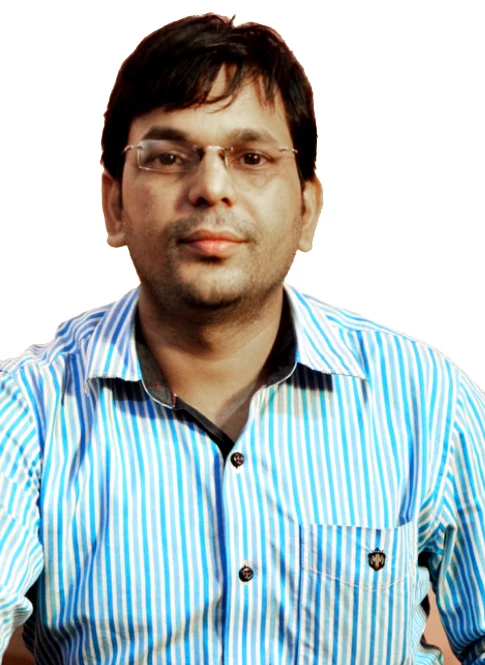
Into this person's head....along with the perfect skin tone to this image


make sure the skin tones blends and the head aligns well

Thanks,

Dan

    This topic has been closed for replies.

    4 replies

    Trevor.Dennis
    Community Expert
    Community Expert
    February 13, 2019

    https://forums.adobe.com/people/Daniel%27s+Design

    Dan, this is not an easy fix.  I'm not even going to show you my Layers panel, because it is an over complicated mess with five curves layers, two Hue/Sat layers, and a Vibrance layer.

    But as a starting point with fixes like this, I like to try and make it easy for myself by giving myself some numbers to guide me, and that's done with the Colour Sampler tool.  This takes out the guessing, as the numbers don't lie

    So this has #1 and #2 matched.  It's too saturated, but an overall sat decrease will fix that.

    Roughly sort out the local area with the layer mask, and do the reset of the sample points.

    Like I said above, it took a few layers with some of the fine tuning being to reduce the contrast in the new head, and reduce saturation behind the hair.  The bottom line is that this is really not an easy fix, so kudos to anyone who can get a perfect match.

    Daniel_s_Design
    Known Participant
    February 14, 2019

    I came up with this...but i need to fix the neck area...can anyone help me out ! 

    Thanks,

    everyone

    Fletch45
    Known Participant
    February 13, 2019

    What sort of information do you need?

    Are you wanting to know more about how to move the head from one to the other?

    Or do you want to know more about how to correct the skin tone?

    Daniel_s_Design
    Known Participant
    February 13, 2019

    both at the same time..

    #fletch

    JJMack
    Community Expert
    Community Expert
    February 13, 2019

    Try this tutorial

    JJMack
    Daniel_s_Design
    Known Participant
    February 13, 2019

    i've gone through this video...

    thanks

    jjmack

    Community Expert
    February 13, 2019

    Not sure we can get the exact skin tone. But you can surely resize the head to fit on a layer with a low opacity so that you can scale to size. Then you can mask out the background and mask some of the features or the entire face. Then you can try using adjustments layers such as levels and color balance to play with the colors.

    From the looks of it, you can take the top man with darker skin and mask the entire face and neck inside his shirt. Then all you will have to do darken his hands to match the face and neck. Just select his hands and apply some adjustments using levels, hue/saturation and or color balance to darken the hands of the man with the tablet.

    hope that helps! This sort of stuff is fun!

    Cheers,
    mark

    headTrix, Inc. | Adobe Certified Training & Consulting
    Daniel_s_Design
    Known Participant
    February 13, 2019

    can  show me a demo...here's mine 80% done

    thanks,

    Mark

    Community Expert
    February 13, 2019

    I don't think you need a demo. Looks like you did a great job! Maybe you just need to zoom in and clean up your mask a little bit. You can use a soft brush with the airbrush checked, lower the flow, zoom in tight and use a small brush with a low flow (under 20%) and slowly clean up around the head.

    Maybe scale it a tad bit more, add a levels adjustment to play with the darks and lights, maybe sharpen it a little bit....and I think you would fool everyone!

    Nice work!Cheers,

    mark

    headTrix, Inc. | Adobe Certified Training & Consulting