Participant
March 10, 2019
Question

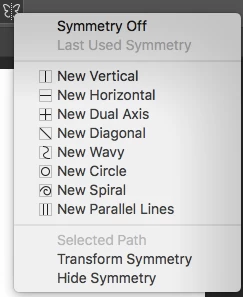
Symmetry Tool Radial and Mandala Option Unavailable
  • March 10, 2019
  • 5 replies
  • 2497 views

I just updated Photoshop and was following the instructions provided by Adobe to try out the new symmetry tool, but two options, radial and mandala, were nowhere to be seen. I attached a screenshot above. Not sure what to do.

!

This topic has been closed for replies.

5 replies

Chuck Uebele
Community Expert
Community Expert
August 17, 2019

Looks like you're not using 2019. Install it.

Here's a link to make screenshots without the keyboard.

https://www.google.com/url?sa=t&source=web&rct=j&url=https://www.digitaltrends.com/mobile/how-to-take-a-screenshot-on-a-…

heatherm29731569
Participant
August 15, 2019

I am having the same issue. I was using the mandala option 2 days ago and it is no longer there today... please help! I have made sure my PS is up to date.

JJMack
Community Expert
Community Expert
August 15, 2019

Are you sure your Photoshop CC 2019 is at version 20.0.6 and you GPU is enabled????

JJMack
heatherm29731569
Participant
August 17, 2019

Thank you Mack for getting back to me. Yes all of these are done.  still no tools...

davescm
Community Expert
Community Expert
March 10, 2019

Go to help-system info and check the exact version you are using. The current version is 20.0.3.

Dave

davescm
Community Expert
Community Expert
March 10, 2019

As an aside if you are using CC2018 you can still access Radial and Mandala symmetry. Just choose dual axis and in the paths panel change the path name to Radial Symmetry x (where x is a number from 2 to 12) or Mandala Symmetry y (where y is a number from 2 to 10)

Dave

Participant
May 9, 2020

How do you do that, sir?

JJMack
Community Expert
Community Expert
March 10, 2019

Could it be your are using CC 2018 not CC 2019?

JJMack
gener7
Community Expert
Community Expert
March 10, 2019

That's odd. I see it on my Macbook Pro and it's version 20.0.3

I would go with a Preferences reset and see if that doesn't kick it in.