रतन_म_श_र
Participant
June 30, 2018
Question

System requirements not met Photoshop installation error

  • June 30, 2018
  • 2 replies
  • 11862 views

it's good morning for you adobe not for me. I'm trying to install adobe Photoshop latest version but I'm getting this error. screenshot  is attached,
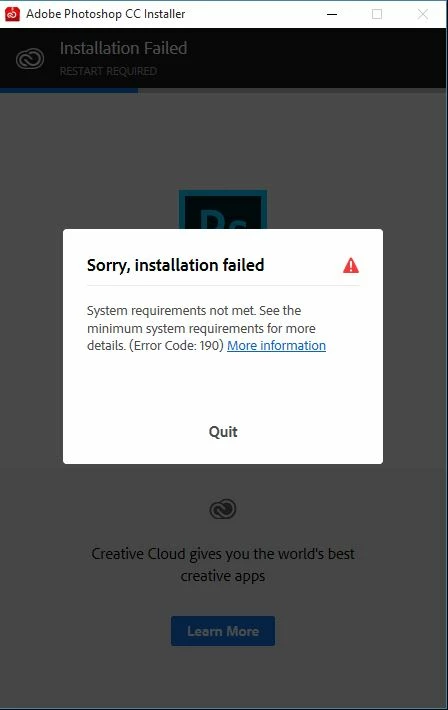
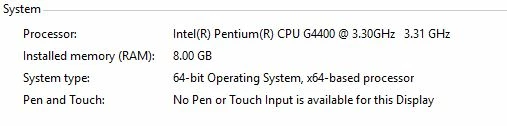
I've checked my system requirement and I've following
when i click on more information,i see this file as html

the path of this file is   "file:///C:/ProgramData/Adobe/Installer/Summary.htm"

i'm getting this message in summary.htm file

i've uninstalled and restarted and tried again  but after 32% of progress again this error show.

please help me.

i'm completely up to you.

Exit Code: 190

-------------------------------------- Summary --------------------------------------

- 2 fatal error(s), 0 error(s), 0 warnings(s)

FATAL: Sanity check for installation failed. Current OS version 10.0.10240 doesn't satisfy OS requirements.

FATAL: Error occured in install product workflow with error code 190 error message

-------------------------------------------------------------------------------------

    This topic has been closed for replies.

    2 replies

    gener7
    Community Expert
    Community Expert
    June 30, 2018

    That's a very old build of Windows 10, see about upgrading it.

    KB 3159635 will upgrade you to Windows 10 version 1511 | Computerworld

    John Waller
    Community Expert
    Community Expert
    June 30, 2018

    FATAL: Sanity check for installation failed. Current OS version 10.0.10240 doesn't satisfy OS requirements.

    The issue seems to be your operating system, not your hardware.

    That's a confusing operating system version.

    "file:///C:/ProgramData/Adobe/Installer/Summary.htm" is a Windows file path.

    But your Exit Code: 190  says you're running OS X 10.0 (Cheetah). But that's a very old version from 2001 which does not run on Intel processors.

    Please confirm your exact operating system version.

    Ussnorway7605025
    Legend
    June 30, 2018

    an old Threshold version of Windows 10 that was never clean installed can cause 190 errors because the app can't match the build numbers up

    assuming he is in fact using the Adobe CC app to run the install then the best fix is a clean install of Windows + reload the Adobe apps (from Cc app) one at a time

    gener7
    Community Expert
    Community Expert
    June 30, 2018

    Then he can get an ISO here: Download Windows 10 Disc Image (ISO File)