
Participant
October 27, 2017
Question

Tablet Pen Keeps Duplicating Layers?

  • October 27, 2017
  • 2 replies
  • 1675 views

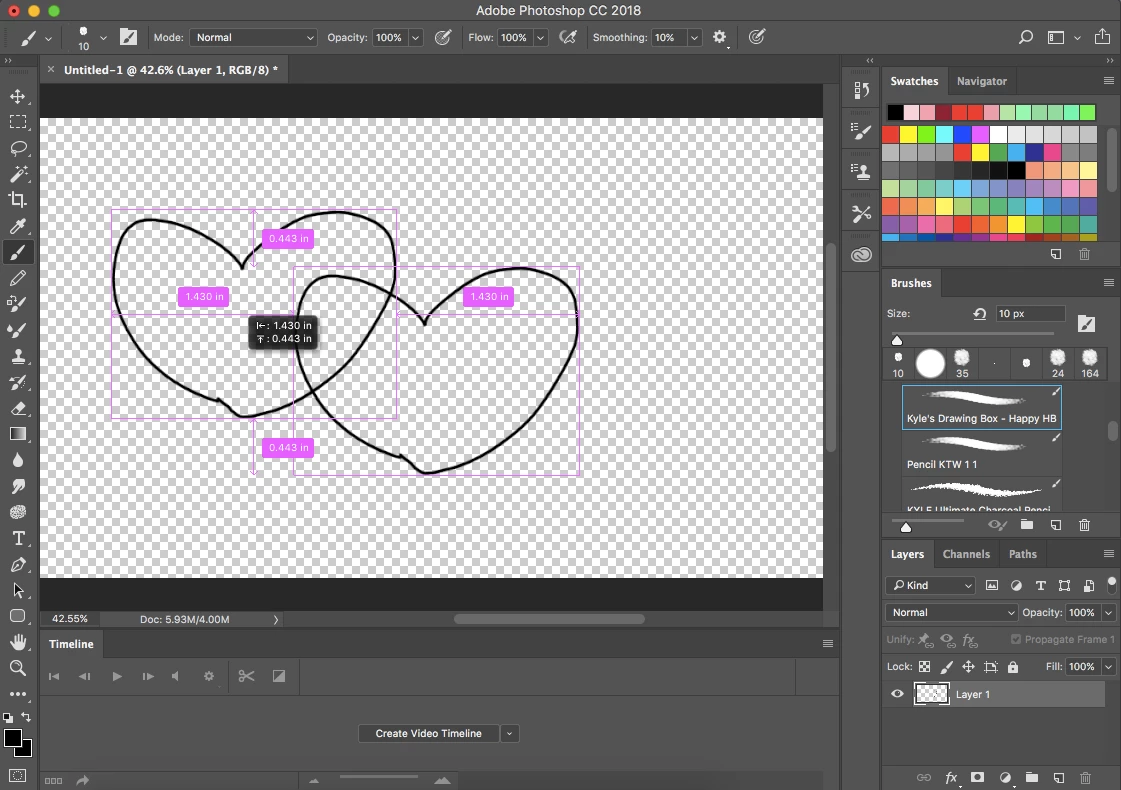
I have a Wacom Intuos Pro and I've just started using Photoshop. I have an issue where everytime I try to draw, the layer is duplicated and moved. I attached an image of it below, this happens any time i try to draw even though the paintbrush is selected. The weird thing is that I can draw perfectly fine when using the touchpad of my macbook, which is how I drew the hearts in the image because otherwise I wouldn't have been able to. Has anyone else had this issue or knows how to resolve it? I've never had issues with other programs I've used with my tablet before so this is really strange. Any help is appreciated !
This topic has been closed for replies.

2 replies

Trevor.Dennis
Community Expert
Community Expert
October 27, 2017

One way that could happen is if you pressed the Cltr and Alt keys and moved the cursor.  Ctrl temporarily changes the brush to the Move tool, and adding the Alt key will cause the Move tool to copy.  Are pressing one of the buttons on the pen?  You would know this was happening because the cursor would change to the double arrow head.

What are the buttons set to in Wacom Preferences?

JJMack
Community Expert
Community Expert
October 27, 2017

That screen capture is strange. You have only one layer you have the brush tool active yet it look like you are move a hart shape brush stroke in the mainly empty layer and there are smart guides are being displayed to help yo align the move.  That should not happen IMO.  Try resetting your  Wacom Preferences it that does not resolve you Problem Try resetting Photoshop tools. If the doe nor resolve the problem try resetting your Photoshop preferences.

JJMack