
Participant
December 18, 2016
Answered

Text Appearing Outside Textbox

  • December 18, 2016
  • 3 replies
  • 3599 views

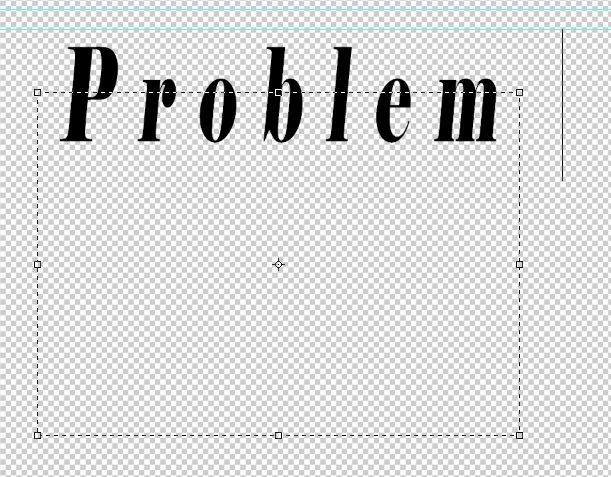
I am using the latest CC release of Photoshop and attempting to do a simple text layout for a shop project, but the frustration I am running into is that the text does not start within the textbox. It does not matter what text I choose, what size, what leading or anything else I have tried. It has become very frustrating because of the time it is adding to a simple task. After one box is finally complete and I move it so the text is actually where I want it, the bounds of the box interfere with the other textboxes I need to insert. Any help with this would be greatly appreciated.

Cheers,

Brad Koop
This topic has been closed for replies.
Correct answer BKdigirev

Thank you both for your replies. Trevor.Dennis , I reset my palette after reading your comment and discovered that it was not the baseline shift (which was at zero prior to the reset), but rather it was the vertical scaling that was off. If I could add sound to this you would hear a pronounced slapping of hand to forehead.

Merry Christmas, and thanks again.

3 replies

BKdigirevAuthorCorrect answer
Participant
December 24, 2016

Thank you both for your replies. Trevor.Dennis , I reset my palette after reading your comment and discovered that it was not the baseline shift (which was at zero prior to the reset), but rather it was the vertical scaling that was off. If I could add sound to this you would hear a pronounced slapping of hand to forehead.

Merry Christmas, and thanks again.

Trevor.Dennis
Community Expert
Community Expert
December 25, 2016

BKdigirev wrote:

Thank you both for your replies. Trevor.Dennis , I reset my palette after reading your comment and discovered that it was not the baseline shift (which was at zero prior to the reset), but rather it was the vertical scaling that was off. If I could add sound to this you would hear a pronounced slapping of hand to forehead.

Merry Christmas, and thanks again.

Thanks for the feedback.  While we are glad you have fixed your problem, many of us are going to now have sleepless nights thinking about the hideous vandalization of a carefully designed typeface.  It gives a whole new meaning to the phrase 'Character Assassination'.

Trevor.Dennis
Community Expert
Community Expert
December 18, 2016

Character panel

postrophe
Inspiring
December 18, 2016

Hi

The screenshot we want to see is your Character & Paragraph palets, while this text box is selected.

Pierre