
Participant
December 28, 2017
Answered

Text bounding box disappears when I zoom in

  • December 28, 2017
  • 1 reply
  • 576 views

I've started working on a fairly large psb file (1080 x 44382px) and it seems I'm experiencing either memory or graphics issues. I'm a bit confused as this has never happened before (but I haven't exactly worked on a file this big either). When I edit the text that's at the beginning of the file, I can actually see the bounding box at 100%, however, the further I go down the file and edit, the more I have to zoom out to actually start seeing the box. It has come to a point where I now see it only at 35% and it's becoming very difficult to edit the file. I already tried editing the file performance options and allocated ~12gb of RAM to PS. I've looked this up online, but I'm not exactly sure what I'm having trouble with as I'm not getting any errors (no memory issue errors, nothing).

This is my performance settings if it helps:
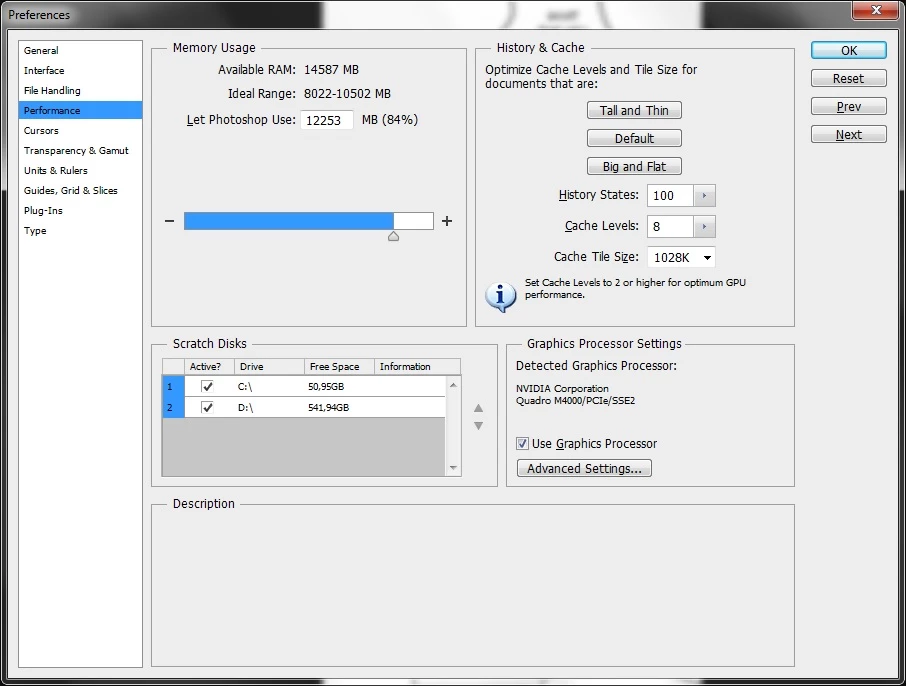
This topic has been closed for replies.
Correct answer davescm

A couple of things :

Can you try with the GPU unchecked (you will need to re-open the document).

What version of Photoshop are you using?  - I will try it here with a similar size document.

Dave

1 reply

davescm
Community Expert
Community Expert
December 28, 2017

I've not seen that symptom when running short of memory/scratch disk  but symptoms can vary. You could try making your D drive your primary scratch disk. 50GB of space on the C is not a lot and will quickly fill up if using large files.. Just highlight D and move it upward with the arrow symbol.

Don't be tempted to push the mory available to Photoshop too high. The rest of your system still needs RAM space to operate.

Dave

Participant
December 28, 2017

Thank you for the input! I tried doing as you suggested, restarted my PC, but I'm afraid the problem still persists.

davescm
Community Expert
davescmCommunity ExpertCorrect answer
Community Expert
December 28, 2017

A couple of things :

Can you try with the GPU unchecked (you will need to re-open the document).

What version of Photoshop are you using?  - I will try it here with a similar size document.

Dave