Participating Frequently
October 9, 2021
Question

Text Bubble in Photoshop

  • October 9, 2021
  • 2 replies
  • 492 views

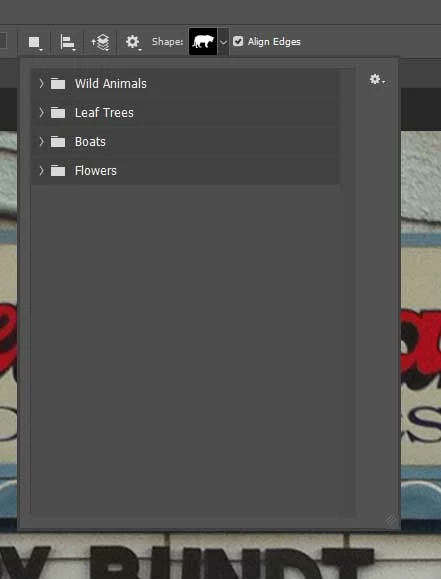
I'm trying to insert a text bubble in photoshop. Instead of what I normally see whan I click on the shapes selection, I now have folders with very specific types of shapes, not the normal text bubble, starburst. heart shape, lightening bolt, etc. that I've seen in the past. Anyone know how to change this back?
This topic has been closed for replies.

2 replies

Barb Binder
Community Expert
Community Expert
October 9, 2021

Hi @Kurt S :


As per @jane-e, start with Window > Shapes, then:


~Barb

~Barb at Rocky Mountain Training
jane-e
Community Expert
Community Expert
October 9, 2021

Nice video @Barb Binder  !


~ Jane

Nancy OShea
Community Expert
Community Expert
October 9, 2021

Click the gear icon for more shapes.


Nancy O'Shea— Product User & Community Expert
Kurt SAuthor
Participating Frequently
October 9, 2021

Clicking on the gear icon just brings up this dropdown window, no shapes.


jane-e
Community Expert
Community Expert
October 9, 2021

Hi @Kurt S 


Instead of using the options bar, go to the Window menu and open the new-ish Shapes panel. Use the panel menu to bring back the Legacy Shapes.


~ Jane