
Text Issue in Photoshop 2020
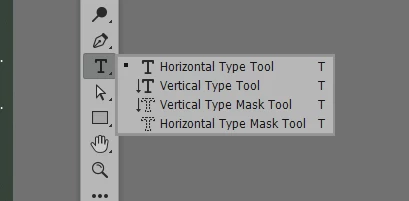
New to photoshop and seem to be having a problem with adding text. I select the T tool and my cursor changes, then when I click on the workspace it turns pink and I type my text which appears. I then click on the check mark, my screen turns white and the text appears in a shimmering format with diagonal lines and it does not create a text layer. If I click on the workspace again the screen turns ping and starts the cycle again. I have checked the mode and it is set to RGB Color, 8 Bits/Channel.
Please help and thank you
You need to ask program questions in the forum for the program you are using
To ask in the forum for your program please start at https://community.adobe.com/
Moving from Using the Community (which is about the forums) to the correct forum... Mod
 AdChoices