
Participant
October 26, 2018
Answered

Text layer (textItem) shifts to the left when contents changes

  • October 26, 2018
  • 1 reply
  • 1217 views

Hello!

On my PSD, when I change textItem.contents, it causes the layer to shift to the left.

Here is a screenshot from our artist:
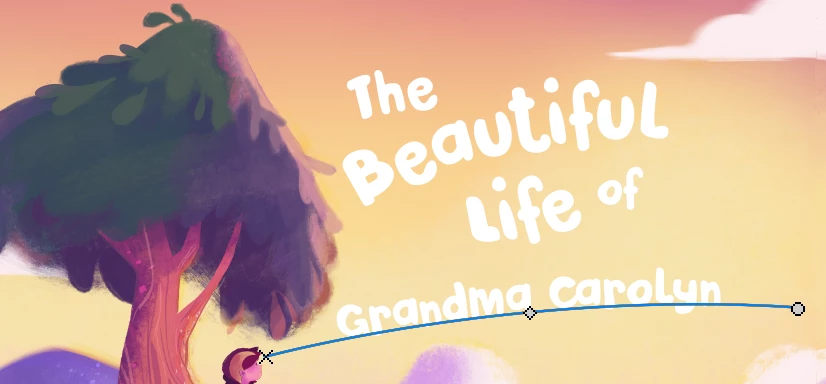
If I run the following code (with the same text!)...

app.activeDocument.layers['text1'].textItem.contents = "Grandma Carolyn"

...the text shifts to the left:
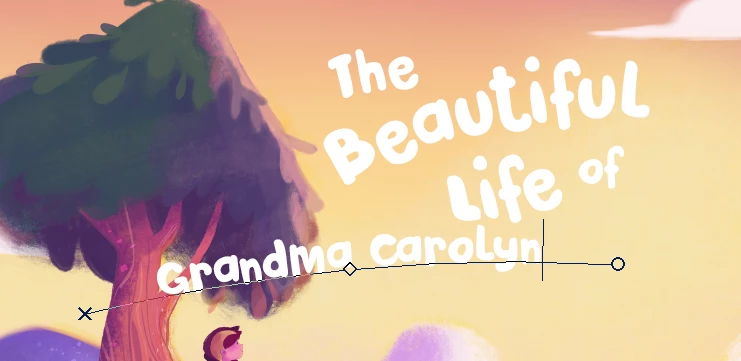
If I run the JavaScript code again, the text shifts again:
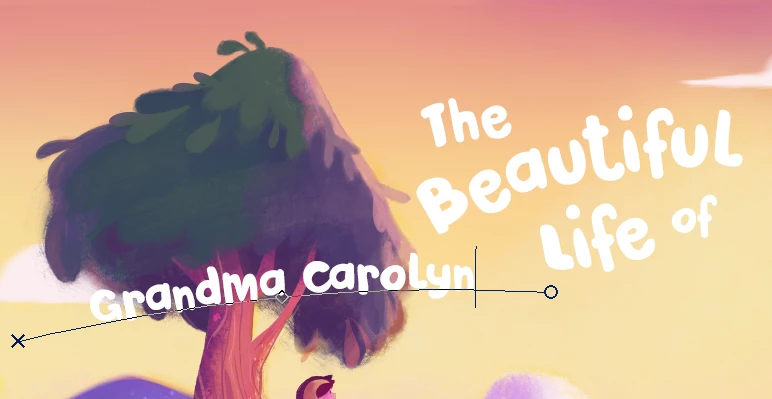
I can confirm that textItem.position has changed:

alert(app.activeDocument.layers['text1'].textItem.position)

app.activeDocument.layers['text1'].textItem.contents = "Grandma Carolyn"

alert(app.activeDocument.layers['text1'].textItem.position)

The first alert displays "15.95 in, 5.17 in". The second alert displays "13.81 in, 4.88 in".

I've also tried resetting the position after changing the contents, but it didn't work:

var prev_position = app.activeDocument.layers['text1'].textItem.position;

app.activeDocument.layers['text1'].textItem.contents = "Grandma Carolyn"

app.activeDocument.layers['text1'].textItem.position = prev_position;

Any help appreciated!

This topic has been closed for replies.
Correct answer r-bin

Hmm, that didn't work. I received this error message:

376:412: execution error: Adobe Photoshop CC 2018 got an error: General Photoshop error occurred. This functionality may not be available in this version of Photoshop.

- Error 8800: General Photoshop error occurred. This functionality may not be available in this version of Photoshop.

->   (8800)ional information available>

It seems to be this line:

     executeActionGet(r).getObjectValue(stringIDToTypeID("textKey"))


But I have everything working with your file in CC2018 (win7).
You must have your problem text layer active when you run the script. Check it out.

UPD.

I found why there is a shift.
This is most likely a bug.

To reproduce it with a layer on which this does not happen, you need to select type or pen tool, make the layer path active and call the transformation (Ctrt+T).

After the transformation of the path, a shift appears when you try to change the text.

1 reply

Legend
October 27, 2018

Could you provide a file with one such layer?
I cannot reproduce the situation on either CS6 or CC2018.

Participant
October 29, 2018

Hi r-bin​, yes, thanks. Here is a link to the PSD file with the offending layer.

https://www.dropbox.com/s/cf02q39ukto2mvd/cover.psd?dl=0

Legend
October 29, 2018

Very strange mistake. Most likely, the data of the layer that is impossible to read through the script is damaged. What exactly is not clear.

Run this script with the active problem text layer.

It will make a complete duplicate of the layer, which will already be normal.
I could not repeat exactly as I do not have your font. But you should work.

var bad_layer = app.activeDocument.activeLayer;

var layer_name = app.activeDocument.activeLayer.name;

var r = new ActionReference();     

r.putProperty(stringIDToTypeID("property"), stringIDToTypeID("textKey"));         

r.putEnumerated(stringIDToTypeID("layer"), stringIDToTypeID("ordinal"), stringIDToTypeID("targetEnum"));     

create_text(executeActionGet(r).getObjectValue(stringIDToTypeID("textKey")));   

bad_layer.remove();

app.activeDocument.activeLayer.name = layer_name;

function create_text(data)   

    {   

    try {   

        var d = new ActionDescriptor();   

        var r = new ActionReference();   

        r.putClass(stringIDToTypeID("textLayer"));   

        d.putReference(stringIDToTypeID("null"), r);   

        d.putObject(stringIDToTypeID("using"), stringIDToTypeID("textLayer"), data);   

        executeAction(stringIDToTypeID("make"), d, DialogModes.NO);   

        }   

    catch (e) { throw(e); }   

    }