
Participant
October 16, 2017
Answered

Text outside of text box?
  • October 16, 2017
  • 2 replies
  • 10704 views

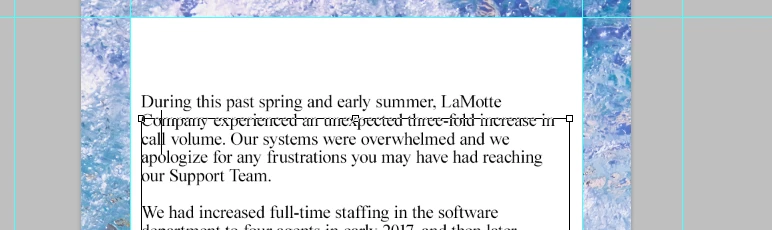
As you can see, my text box is where I need the text to be but, the first sentence is placed outside of it. Also, if you couldn't tell my cursor is really large and makes it extremely hard to tell what line I am on. I've tried resetting the tools, adjusting my character styles etc etc. but nothing seems to be working.

I'm using Photoshop CC so if someone could help me figure out whats going on I would greatly appreciate it.

This topic has been closed for replies.
Correct answer SJRiegel

It looks like Baseline Shift.

Try selecting all of your text and changing the baseline shift in the character pallet to 0

2 replies

SJRiegelCorrect answer
Legend
October 16, 2017

It looks like Baseline Shift.

Try selecting all of your text and changing the baseline shift in the character pallet to 0

Participant
October 16, 2017

Baseline Shift was it! forgot I had done that in a previous project and I guess it stuck but thank you very much

davescm
Community Expert
Community Expert
October 16, 2017

Can you show the layers panel with the text layer selected and the character panel . That looks like you are showing the bounding box for a separate text layer - but the screenshots will help see what is actually happening

Dave