
Participating Frequently
April 22, 2024
解決済み

Text/paragraph problem \....question

  • April 22, 2024
  • 返信数 3.
  • 535 ビュー

I have the Photogrpahy subscription so I'm using the latest version of Photoshop.

I realize that it's not the optimum program to use to design books but it's what I have and I've designed quite a few books using PS. 


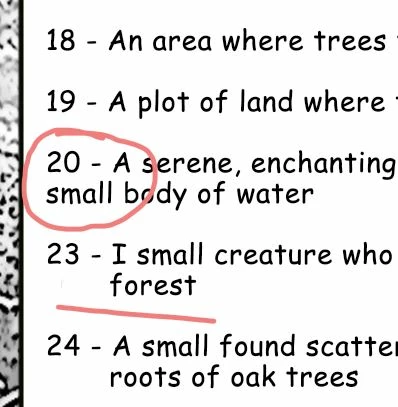
My issue is, and has been for years, when I paste copy into a text window and it forms multiple lines, when I try to move a line of text from the left side over a few spaces, neither the space bar nor the tab key will move the line of text unless I press either one, or both, several times. And THEN it'll move. But the text will not budge the first few times I try. I hope that I'm explaining this correctly. I'll paste a screen shot to try to show what I mean. I'm trying here to get the line that reads "small body of water" lined up with the line of text above it. I would think that I could simply hit the tab key or the space bar to move it. It won't...until I do that several times. Very frustrating. 
Thanks in advance. 
このトピックへの返信は締め切られました。
解決に役立った回答 jane-e


quote

neither the space bar nor the tab key will move the line of text unless I press either one, or both, several times. And THEN it'll move. But the text will not budge the first few times I try.

By @painterskip34


The first few times you try, all you are doing is adding spaces and tabs to the end of the first line. It takes a while for it to affect the second line.


Try this instead:

  • First, remove all spaces and tabs between "enchanting" and "small body"
  • Then press Shift+Return after "enchanting"
  • Now, with your cursor in front of the "s" in "small", press the tab key again


Note: if Shift+Return does not work, try Return.


You are correct that this would be super simple in InDesign, which has hanging indents that line up the text automatically. You are working inefficiently and much too hard when you try to format books in Photoshop.


Jane

返信数 3

jane-e
Community Expert
jane-eCommunity Expert解決!
Community Expert
April 22, 2024


quote

neither the space bar nor the tab key will move the line of text unless I press either one, or both, several times. And THEN it'll move. But the text will not budge the first few times I try.

By @painterskip34


The first few times you try, all you are doing is adding spaces and tabs to the end of the first line. It takes a while for it to affect the second line.


Try this instead:

  • First, remove all spaces and tabs between "enchanting" and "small body"
  • Then press Shift+Return after "enchanting"
  • Now, with your cursor in front of the "s" in "small", press the tab key again


Note: if Shift+Return does not work, try Return.


You are correct that this would be super simple in InDesign, which has hanging indents that line up the text automatically. You are working inefficiently and much too hard when you try to format books in Photoshop.


Jane

painterskip34作成者
Participating Frequently
April 30, 2024

Thanks so much for the tips to try. And apologies for the delayed reply. 

And you are correct about not using InDesign. I'll be adding that to my subscription soon, but a little wary of the learning curve. I've created a lot of books in Photoshop, for better or worse:-) All were basically photo books or had an equal amount of text and images. I just dealt with it...swore a lot:-) 
Thanks again. 


painterskip34作成者
Participating Frequently
April 30, 2024

That seems to have worked!! Thanks!!!

Legend
April 22, 2024

I'm afraid that you are hitting a limitation of Photoshop, its not designed for text formatting. You might look on Adobe Exchange for a text formatting/columns plugin, I believe there are some that could be of help.

painterskip34作成者
Participating Frequently
April 30, 2024

Thanks! I never thought of using a plugin for that. I'll look. 

kglad
Community Expert
Community Expert
April 22, 2024

in the future, to find the best place to post your message, use the list here, https://community.adobe.com/

p.s. i don't think the adobe website, and forums in particular, are easy to navigate, so don't spend a lot of time searching that forum list. do your best and we'll move the post (like this one has already been moved) if it helps you get responses.


<"moved from cc desktop">
painterskip34作成者
Participating Frequently
April 30, 2024

Thank you. I don't visit here as often as I should. I'll try to be more careful next time.