
Text width auto-sets to 95% every time I create a new textbox.
This is an issue I've been having both in Photoshop 2020 and 2019. Whenever I create a new textbox, the text width defaults to 95% for NO apparent reason. I've literally never needed to use this setting, and I can't work out why this is happening. I also can't find a way to change this default setting or get it to reset at all. I've tried the 'reset when Photoshop closes' option, I've tried using the shortcut to reset the setting, but nothing sticks.
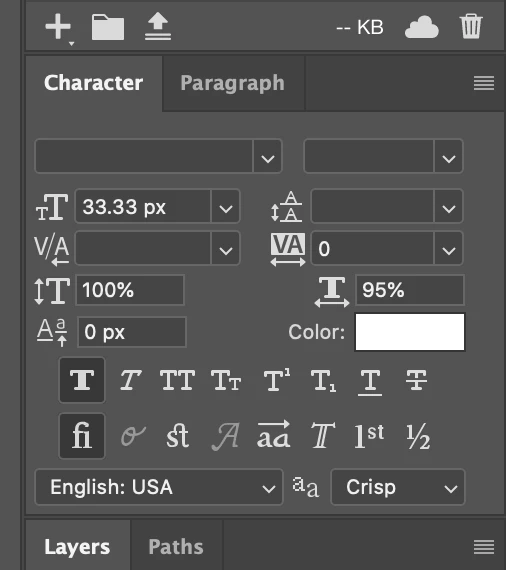
I was hoping it would be fixed in the 2020 but I can't seem to work out why this random setting is defaulting in this way, when honestly it's a setting I have never once used. It took a long time to even realise this was happening because of this. I'm a graphic designer and cannot afford for this random thing to keep happening and have it sent to the client and/or have the developers try to build it like this.
 AdChoices