
Inspiring
August 9, 2024
Question

The Bounds of the POINTTEXT layer does not contain space characters

  • August 9, 2024
  • 4 replies
  • 1048 views

There are 10 spaces after 1, and the width of bounds is 1814

After replacing the last space in the line where the number 1 is located with X, the bounds width becomes 2043
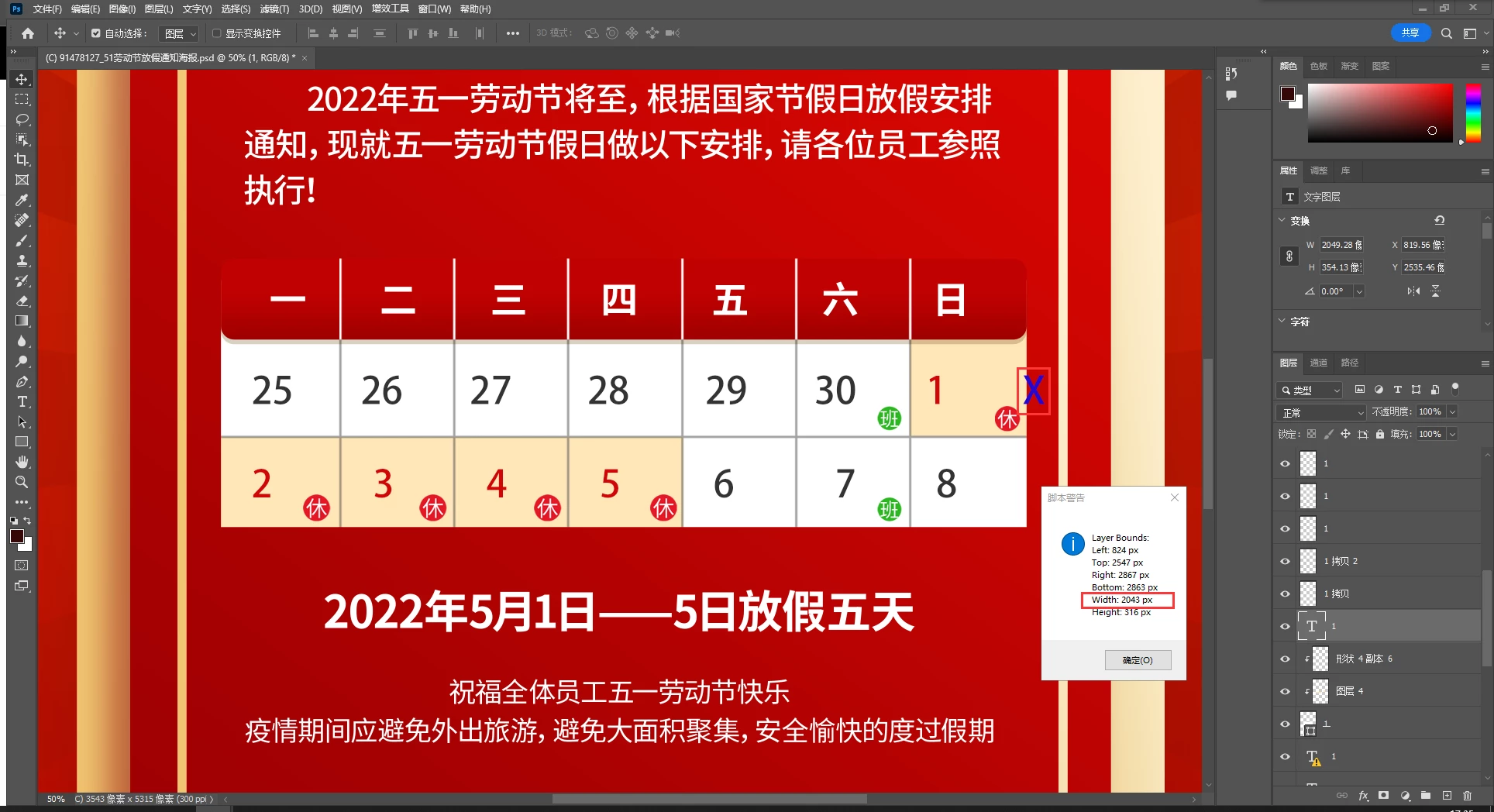
My question is how to get the width and height of the text layer including the trailing space?

This topic has been closed for replies.

4 replies

jane-e
Community Expert
Community Expert
August 10, 2024
quote

The Bounds of the POINTTEXT layer does not contain space characters

My question is how to get the width and height of the text layer including the trailing space?

By @javaer


Spaces do not have a consistent width. Some spaces may be wider while others are narrower.


I was about to suggest a non-breaking space (which has a consistent width), but when I looked it up I found that Photoshop does not support them. Photoshop is primarily an image editor with very limited text controls. You might make a feature request to the product developers if you are not able to use a page layout application for your project.


Although you did not ask, pay attention to the alignment of your numbers, which are all over the place.


Jane


javaerAuthor
Inspiring
August 19, 2024

Thank you very much for your reply

c.pfaffenbichler
Community Expert
Community Expert
August 10, 2024


// type layer bounds;
// based on code by michael l hale;
// 2024, use it at your own risk;
if (app.documents.length > 0) {
var ref = new ActionReference();
ref.putProperty(stringIDToTypeID("property"), stringIDToTypeID('textKey'));
ref.putEnumerated( charIDToTypeID("Lyr "), charIDToTypeID("Ordn"), charIDToTypeID("Trgt") ); 
var layerDesc = executeActionGet(ref);
var textDesc = layerDesc.getObjectValue(stringIDToTypeID('textKey'));
var theBounds = textDesc.getObjectValue(stringIDToTypeID("bounds"));
var theWidth = Number(theBounds.getUnitDoubleValue(stringIDToTypeID("right"))) - Number(theBounds.getUnitDoubleValue(stringIDToTypeID("left")));
var theHeight = Number(theBounds.getUnitDoubleValue(stringIDToTypeID("bottom"))) - Number(theBounds.getUnitDoubleValue(stringIDToTypeID("top")));
var thePoint = textDesc.getObjectValue(stringIDToTypeID("textClickPoint"));
pointH = thePoint.getUnitDoubleValue(stringIDToTypeID("horizontal"));
pointV = thePoint.getUnitDoubleValue(stringIDToTypeID("vertical"));
var theBounds = checkDesc2 (theBounds);
alert ("\n\nthe width "+theWidth+"\nthe height "+theHeight+"\n\nbounds\n"+theBounds)
};
////// based on code by michael l hale //////
function checkDesc2 (theDesc, theAlert) {
var c = theDesc.count;
var str = '';
for(var i=0;i<c;i++){ //enumerate descriptor's keys
	str = str + 'Key '+i+' = '+typeIDToStringID(theDesc.getKey(i))+': '+theDesc.getType(theDesc.getKey(i))+'\n'+getValues (theDesc, i)+'\n';
	};
if (theAlert == true) {alert("desc\n\n"+str);
return};
return str
};
////// check //////
function getValues (theDesc, theNumber) {
switch (theDesc.getType(theDesc.getKey(theNumber))) {
case DescValueType.ALIASTYPE:
return theDesc.getPath(theDesc.getKey(theNumber));
break;
case DescValueType.BOOLEANTYPE:
return theDesc.getBoolean(theDesc.getKey(theNumber));
break;
case DescValueType.CLASSTYPE:
return theDesc.getClass(theDesc.getKey(theNumber));
break;
case DescValueType.DOUBLETYPE:
return theDesc.getDouble(theDesc.getKey(theNumber));
break;
case DescValueType.ENUMERATEDTYPE:
return (typeIDToStringID(theDesc.getEnumerationValue(theDesc.getKey(theNumber)))+"_"+typeIDToStringID(theDesc.getEnumerationType(theDesc.getKey(theNumber))));
break;
case DescValueType.INTEGERTYPE:
return theDesc.getInteger(theDesc.getKey(theNumber));
break;
case DescValueType.LISTTYPE:
return theDesc.getList(theDesc.getKey(theNumber));
break;
case DescValueType.OBJECTTYPE:
return (theDesc.getObjectValue(theDesc.getKey(theNumber))+"_"+typeIDToStringID(theDesc.getObjectType(theDesc.getKey(theNumber))));
break;
case DescValueType.RAWTYPE:
return theDesc.getReference(theDesc.getData(theNumber));
break;
case DescValueType.REFERENCETYPE:
return theDesc.getReference(theDesc.getKey(theNumber));
break;
case DescValueType.STRINGTYPE:
return theDesc.getString(theDesc.getKey(theNumber));
break;
case DescValueType.UNITDOUBLE:
return (theDesc.getUnitDoubleValue(theDesc.getKey(theNumber))+"_"+typeIDToStringID(theDesc.getUnitDoubleType(theDesc.getKey(theNumber))));
break;
default: 
break;
};
};


javaerAuthor
Inspiring
August 12, 2024

The left and top values ​​of "doc.activeLayer.bounds" are inconsistent with the left and top values ​​in the above code. Why is this?

c.pfaffenbichler
Community Expert
Community Expert
August 12, 2024

The bounds of the Layer itself are determined by the actual area of the letter/s. 

The textKey’s bounds are not, so they also include spaces that have no atcual area. (edited)

c.pfaffenbichler
Community Expert
Community Expert
August 9, 2024

Can you provide a sample file (feel free to trash all the other layers)? 

javaerAuthor
Inspiring
August 10, 2024
Stephen Marsh
Community Expert
Community Expert
August 9, 2024

Duplicate the layer.


Convert to paths or rasterize.


Get the layer bounds.


Delete the temporary duped layer.


But this will not help with "white space"... You would need to replace the word spaces with a visible character of the equivalent space. Or perhaps put a pipe character or dot at the end and remove this from the calculation, similar to the X.


Edit: does an underscore or strike through work with the white space?

javaerAuthor
Inspiring
August 10, 2024

All the solutions you suggested require modifying the PSD first, then reading the bounds, and finally restoring. This is too cumbersome. I hope to read some properties, then calculate, and finally get the bounds.

Stephen Marsh
Community Expert
Community Expert
August 10, 2024

Sometimes such things are necessary, but you are correct, in this case they aren't needed. I did find that applying an underscore or strikethrough to the characters does include white space: