Exitus
Participating Frequently
December 2, 2015
Answered

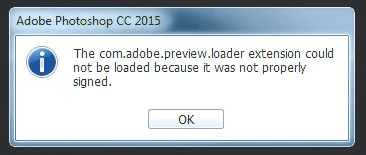
The com.adobe.preview.loader extension could not be loaded because it was not properly signed.

  • December 2, 2015
  • 7 replies
  • 21742 views

After updating Photoshop, I'm getting this error:

"The com.adobe.preview.loader extension could not be loaded because it was not properly signed."

How can I reinstall preview loader extension to fix it?

Thanks.

This topic has been closed for replies.
Correct answer David Alcala - Adobe

To help us understand what's causing this problem, can each person that is experiencing the problem please answer the following questions?:

1. Did you get any errors in the Creative Cloud Application when you first tried installing the Photoshop CC 2015 updates?

2. Did you have any pre-release (beta) versions of Photoshop CC 2015 installed?

3. What OS are you using?

To resolve the issue, please try the following:

  1. Uninstall Photoshop CC 2015 using the uninstaller:
    https://helpx.adobe.com/creative-cloud/help/uninstall-remove-app.html
  2. After the Photoshop uninstall finishes, make sure the following folders have been deleted.  If these folders or any sub-folders are still present, then manually delete them:

    Windows:
    C:\Program Files\Adobe\Adobe Photoshop CC 2015\
    C:\Program Files\Adobe\Adobe Photoshop CC 2015\Required\CEP\extensions\
    C:\Program Files\Common Files\Adobe\Plug-Ins\CC\Generator\

    Mac:
    MacHD/Applications/Adobe Photoshop CC 2015/
    MacHD/Library/Application Support/Adobe/CEP/extensions/
    MacHD/Library/Application Support/Adobe/Plug-ins/CC/Generator/
           
  3. Re-install Photoshop CC 2015 using the Creative Cloud Application.

Please let us know if this solves the problem.  Thanks.

7 replies

Participant
February 28, 2020

I saw the video and I think this could be the solution to your problem.

https://www.youtube.com/watch?v=zJ9cCtxtvaY

Premiopolis
Inspiring
December 2, 2016

Got the same error.  I'm on Mac OS 10.11.16, Photoshop 2017

I tried multiple solutions

    - Clearing the presets as suggested above.

    - Preferences > Plug-Ins > Enable Generator (checked)

    - Load Extension Panels (checked)

    - Preferences > Plug-Ins > Alllow Extensions to Connect to the Internet (Checked)

    - Even tested using one of Davide Barranca's pre-built panels from https://github.com/undavide/PS-Panels-Boilerplate

So far no luck

Always getting the same results: "extension could not be loaded because it was not properly signed"

ms467
Participating Frequently
December 15, 2015

This worked for me also.

Participant
December 9, 2015

This seems to have worked for me.

Thanks.

David Alcala - Adobe
Community Manager
David Alcala - AdobeCommunity ManagerCorrect answer
Community Manager
December 7, 2015

To help us understand what's causing this problem, can each person that is experiencing the problem please answer the following questions?:

1. Did you get any errors in the Creative Cloud Application when you first tried installing the Photoshop CC 2015 updates?

2. Did you have any pre-release (beta) versions of Photoshop CC 2015 installed?

3. What OS are you using?

To resolve the issue, please try the following:

  1. Uninstall Photoshop CC 2015 using the uninstaller:
    https://helpx.adobe.com/creative-cloud/help/uninstall-remove-app.html
  2. After the Photoshop uninstall finishes, make sure the following folders have been deleted.  If these folders or any sub-folders are still present, then manually delete them:

    Windows:
    C:\Program Files\Adobe\Adobe Photoshop CC 2015\
    C:\Program Files\Adobe\Adobe Photoshop CC 2015\Required\CEP\extensions\
    C:\Program Files\Common Files\Adobe\Plug-Ins\CC\Generator\

    Mac:
    MacHD/Applications/Adobe Photoshop CC 2015/
    MacHD/Library/Application Support/Adobe/CEP/extensions/
    MacHD/Library/Application Support/Adobe/Plug-ins/CC/Generator/
           
  3. Re-install Photoshop CC 2015 using the Creative Cloud Application.

Please let us know if this solves the problem.  Thanks.
Mohit Goyal
Community Manager
Community Manager
December 8, 2015

Hi All,

Please check the Knowledge base article for the issue:

com.adobe.preview.loader extension could not be loaded

Hope that helps.

Regards,

~Mohit

Participant
December 6, 2015

Even without renaming the extensions folder, the Export As... function doesn't work for me. I had to reinstall PS CC2015.1.

Mohit Goyal
Community Manager
Community Manager
December 2, 2015

Hi Exitus,

Please reset the Photoshop Preferences back to default.

Steps:

To re-create the preferences files for Photoshop, start the application while holding down Ctrl+Alt+Shift (Windows) or Command+Option+Shift (Mac OS). Then, click Yes to the message, "Delete the Adobe Photoshop Settings file?"


Let us know if that helps.


Regards,

~Mohit

Exitus
ExitusAuthor
Participating Frequently
December 2, 2015

It didn't help. Still getting the message after opening Photoshop.

I remember I'd got "error U44M1P7" updating through Creative Cloud so I'd had to download update manually.

Mohit Goyal
Community Manager
Community Manager
December 2, 2015

Close Photoshop

Open Creative Cloud Desktop App

Go to Preferences Sign out

Now, Open Photoshop

Sign In to it and see if that helps

Thanks,

~Mohit