
Inspiring
June 4, 2023
Answered

The confusing crop tool - setting 900 x 900

  • June 4, 2023
  • 2 replies
  • 856 views

I have never understood well the confusing crop interface.


I 'm trying to make a preset 900px x 900px

But it says px/ inch  which is it? px or inch?
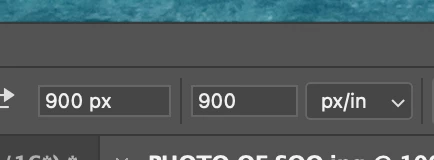


And when I drag out, I still get a retaangle not a square!


ANd if I try to type px  in 2nd box, wont allow cursor in. Stumpe thanks.

 

This topic has been closed for replies.
Correct answer D Fosse

It is a bit confusing.


First you need to set the rolldown to W x H x Resolution, not Ratio.


Then type in measurement units as px. You can set a ppi number in the third field, or you can leave it blank. Doesn't really matter.


The important thing here, what you need to consider, is that this will resample the crop! Are you absolutely sure that's what you want?


If you don't want to resample, just crop out 900 x 900 pixels from the existing image, you use the Rectangular Marquee set to "fixed size".

2 replies

D Fosse
Community Expert
D FosseCommunity ExpertCorrect answer
Community Expert
June 4, 2023

It is a bit confusing.


First you need to set the rolldown to W x H x Resolution, not Ratio.


Then type in measurement units as px. You can set a ppi number in the third field, or you can leave it blank. Doesn't really matter.


The important thing here, what you need to consider, is that this will resample the crop! Are you absolutely sure that's what you want?


If you don't want to resample, just crop out 900 x 900 pixels from the existing image, you use the Rectangular Marquee set to "fixed size".

larry45Author
Inspiring
June 4, 2023

D Fosse thanks ok great, I got it!


I was using the last two boxes as W and H, not two first fields.  whew


You would think after 20 years PS would label those spot on...none are labeled at at all, none... , not 1st , 2nd or mystery 3rd. Wow


BTW,  res did not change, started at 300 and stayed at 300 on my new test.

D Fosse
Community Expert
Community Expert
June 4, 2023

Conrad, excellent post; this will help cement this in my brain for years to come. thanks.


But, I'm not getting tool tips at all. I've been hovering my mouse over all those fields  right now, repeatedly, no yellow tips arrive, any idea?


Maybe you've turned them off in Preferences?


I used to do that, but then I found that sometimes tooltips can actually be useful. Even after 20 years, I don't know everything 🙂

c.pfaffenbichler
Community Expert
Community Expert
June 4, 2023

Could you please post complete screenshots with the pertinent Panels (Toolbar, Layers, Options Bar, …) visible? 


The 900px/in in your screenshot are the resolution, the width is not included in the screenshot.