Known Participant
October 5, 2023
Question

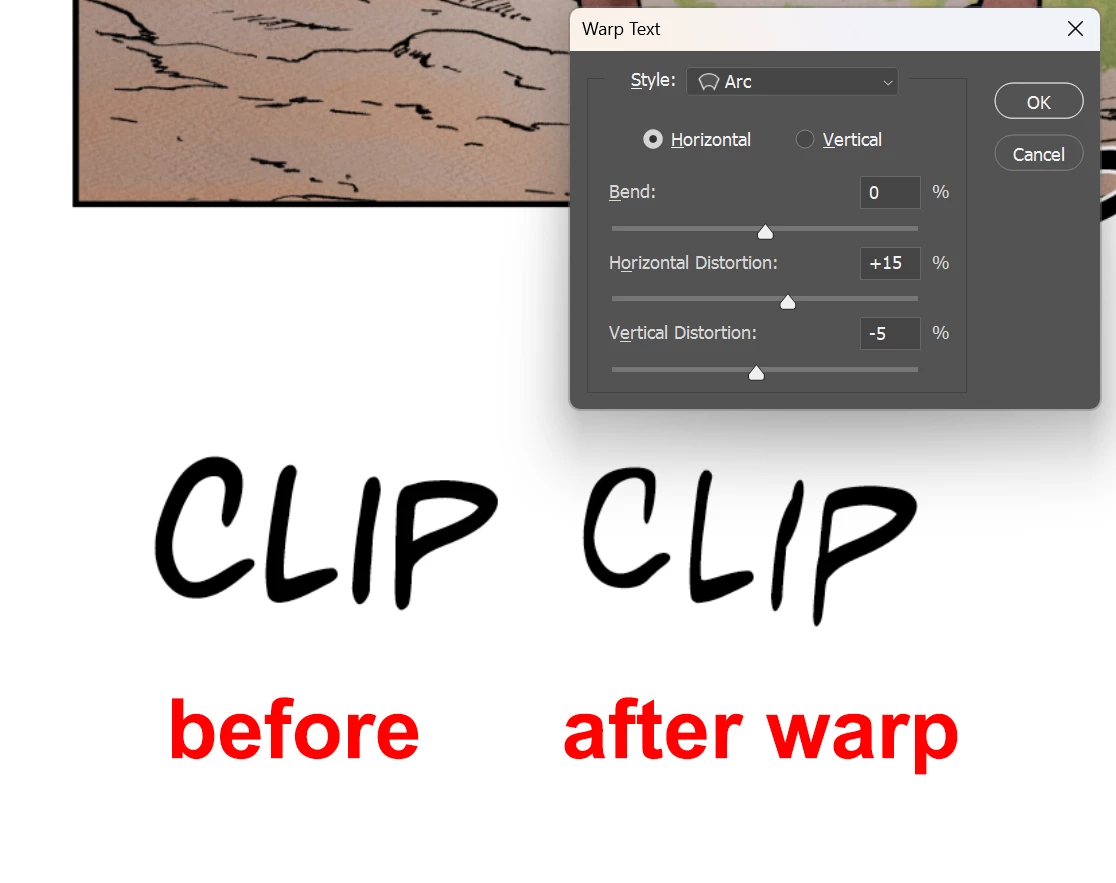
The font is strangely deformed after Warp Text

  • October 5, 2023
  • 2 replies
  • 450 views

This bug only appears in regular fonts. When I change it to italics or bold, the font returns to normal.

I don't know what's going on...


This topic has been closed for replies.

2 replies

Known Participant
October 6, 2023

The strange thing is that after I applied the warp (from an error-free text layer) from the libraries everything worked out. Please watch the video.

Because I couldn't find the file upload option in the reply, I'll post it to GD. You can check it out here: https://drive.google.com/drive/folders/1qbIYdduKI5uvchxnOL4asZX_jMksUz6R?usp=sharing

Sameer K
Community Manager
Community Manager
October 5, 2023

Hey, @Shyob inurarea. We'll need more info to repro this at our end to identify this behavior. Please share the system info from Photoshop Help > System info > Copy & paste into a text document > upload & attach here.


Please share more screenshot, or video of what you see. Include the Character Panel to show the text properties.


In the meantime, ensure Photoshop is in the default state, go to the location of the preference folder below, and rename it to backup. https://helpx.adobe.com/photoshop/using/preferences.html


  • Windows 10/11: Users/[user name]/AppData/Roaming/Adobe/Adobe Photoshop [version]
  • Press Windows + R & type this is the Run Window - %APPDATA%\Adobe

    expand image


  • Rename the Adobe Photoshop folder by adding a .old at the end. (Adobe Photoshop 2024 > Rename > Adobe Photoshop 2024. old)


These changes will give a fresh start to Photoshop as a fresh install. Let me know if the issue exists.

Thanks!

Sameer K