
васяа5910648
Participant
December 24, 2016
Answered

The "inversion" is not working.

  • December 24, 2016
  • 2 replies
  • 1339 views

I do laboratory work on the subject of "Computer Graphics".

I reach this point: "3 14. Hold Ctrl and click the Shade layer, invert the selection Select → Invert or (Ctrl + Shift + I), delete the selected part of the gradient key Delete Deselect (Select → or deselect (Ctrl + D). ". And the inversion button is not active. What should I do?

Win 8. Trial version of the program.
    This topic has been closed for replies.
    Correct answer Barb Binder

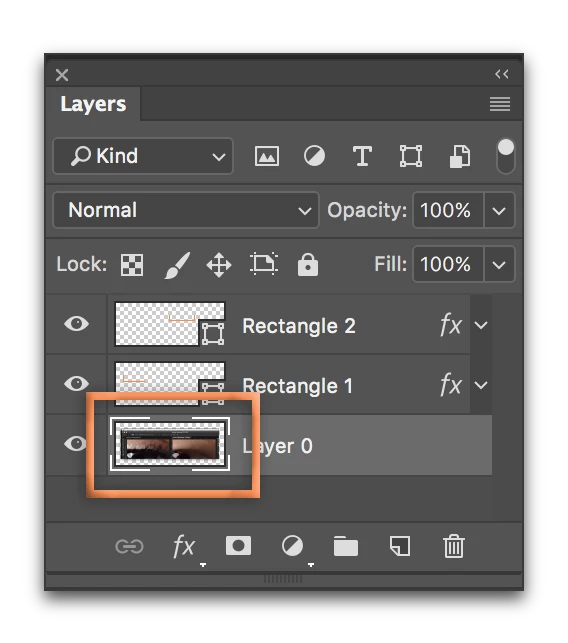
    In the Layers panel, be sure that you Ctrl+click on the thumbnail to load the marching ants. Then Select > Invert will be available.

    2 replies

    davescm
    Community Expert
    Community Expert
    December 24, 2016

    It would be useful to see a snapshot of your layers panel when you try and  Select -Invert and a description of the preceding steps.

    To Invert a selection you have to have a selection made. Your description above does not include that step

    Dave

    васяа5910648
    Participant
    December 24, 2016

    Come on friends, help me please =)

    Barb Binder
    Community Expert
    Barb BinderCommunity ExpertCorrect answer
    Community Expert
    December 24, 2016

    In the Layers panel, be sure that you Ctrl+click on the thumbnail to load the marching ants. Then Select > Invert will be available.

    ~Barb at Rocky Mountain Training
    davescm
    Community Expert
    Community Expert
    December 24, 2016

    Good point BarbBinder

    Or click on the mask if you are trying to invert that

    Dave