
mikaels71195823
Inspiring
November 17, 2020
Question

The Line Tool in PS 2021

  • November 17, 2020
  • 1 reply
  • 1275 views

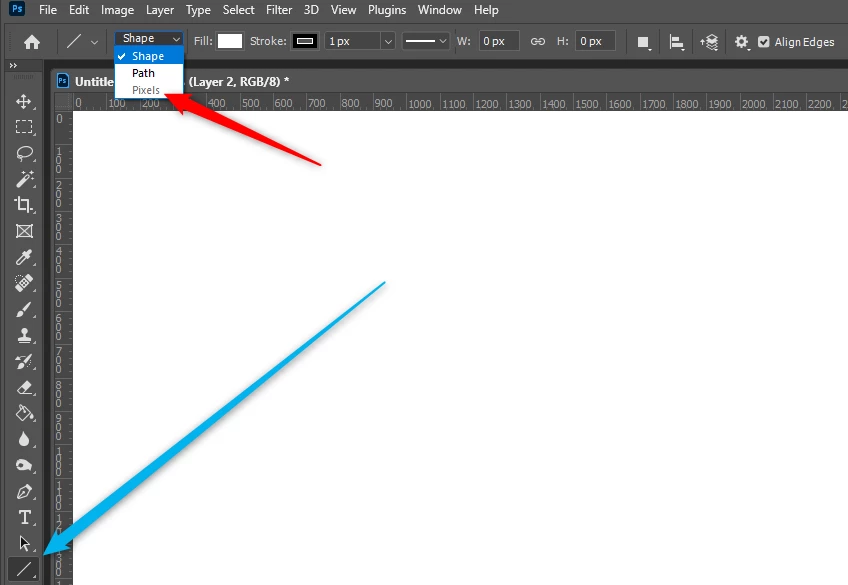
I can no longer draw a line with the Line Tool. No matter how hard I try, I can not select Pixels in the menu, I can only select "Path" or "Shape". See my screenshot.

 

This topic has been closed for replies.

1 reply

JJMack
Community Expert
Community Expert
November 17, 2020

Adobe removed that line tool feature in 2021, Also removed in 2021 is the Line tool's Line weight. So the Line tool shape option can created Arrowed shape layer in 2021 no line shapes.  The line tool Path Option can create closed Arrow Paths with overlapping line paths between  arrowheads. Also changed is Arrowhead getting since line weight was removed size is set in pixels Though it looks like the path has 8 Control Points the are actually 10 control points  4 control points share 2 points.  Adobe has received much negative feedback you should add yours.

If you stroke the Line arrowheads Shape layer on the path or outside the path  the arrow heads will not point to the correct location  the stroke changes the arrowheads points locations.


JJMack
mikaels71195823
Inspiring
November 17, 2020

OK, but I'm not looking for arrows, I'm using the line tool to find horizon and Vanishing Points in my Photoshop montage

Best regards: Micke Seise
JJMack
Community Expert
Community Expert
November 17, 2020

To lay down pixels you would need to use the paint brush Adobe removed that feature from the Line tool. Click and shift click for straight lines with a hard  Paint brush.

JJMack