
Participant
March 24, 2024
Question

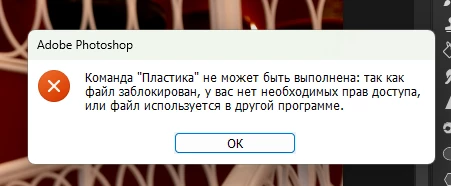
The liquify in Photoshop has stopped working since version 25.4.

  • March 24, 2024
  • 1 reply
  • 320 views

the filter just doesn't open from version 25.4 until today. Neither in the original Photoshop, nor in the Beta version. In the beta version, it gives the following error (in the screenshot)
This topic has been closed for replies.

1 reply

Sameer K
Community Manager
Community Manager
April 11, 2024

Hey, @mr.Koshmar. Welcome to the Photoshop Community. I'll need more info to help you figure this out. Please share a video of this behavior & the system info from Photoshop Help > System info > Copy & paste into a text document > upload & attach here.


Ensure you're working on Photoshop v25.6 & the latest version of Windows. 

Does this happen with a specific document? Try pressing the ALT/OPT key when you click on Filter > Liquify Filter & check if that helps. 


Let me know how it goes. Thanks!
Sameer K

roland.kuhn
Participant
May 19, 2024

Hi Sameer,


I have the same problem exactly. 25.3.1 is the latest version where I can use the liquify filter. When I upgrade at least version 25.4, it stops working. Is there any solution for this?