Participant
December 16, 2019
Question

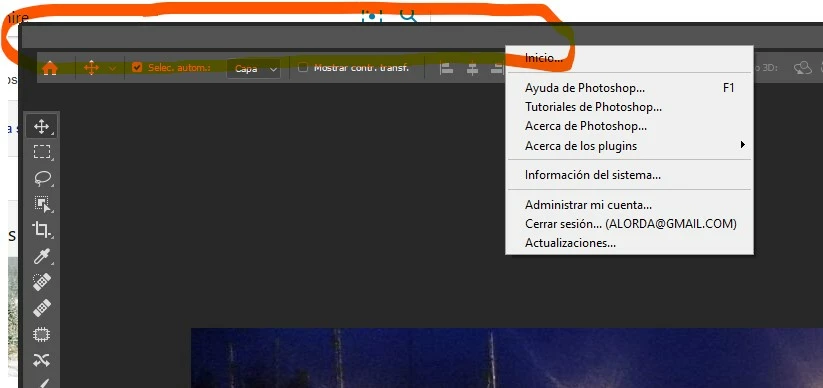
The main menu is there, but I can't see it or read it since the recent update to Photoshop

  • December 16, 2019
  • 1 reply
  • 196 views

After installing version 21.0.2, the menu text has disappeared. I have to guess where it is. Do you have a solution?
thank you
 

{Thread title edited by moderator}

This topic has been closed for replies.

1 reply

nikunj.m
Legend
December 16, 2019

Hi there,


We are sorry about the experience with Photoshop.


Would you mind sharing the version of the operating system you are working on? Have you tried uninstalling and re-install Photoshop to check if that helps?


You can reset the preferences of Photoshop using the steps mentioned in the link below to check if you are able to see the menu bar.

https://helpx.adobe.com/in/photoshop/using/preferences.html


You may want to backup your actions, brushes, etc. before resetting the preferences.

https://helpx.adobe.com/in/photoshop/using/preset-migration.html


Regards,

Nikunj

alordaAuthor
Participant
December 17, 2019

I'd already reinstalled it, and I've done it again. With and without preferences. It didn't work.
The most uncomfortable thing is not being able to see the tabs.
Maybe it's a problem with my graphics card.
I'll let you know if I can fix it.
Thank you very much, Nikunj