Participant
June 16, 2017
Answered

The new Photoshop update

  • June 16, 2017
  • 2 replies
  • 340 views

Sooo, I recently updated Photoshop and it took away the option where you could right click on the composition and it would show you the layers. It was the best thing ever. Now, it's not that and it's driving me crazy that it is not there because it was a feature that used frequently.

Is there any way to get it back?

Thank you
This topic has been closed for replies.
Correct answer Chuck Uebele

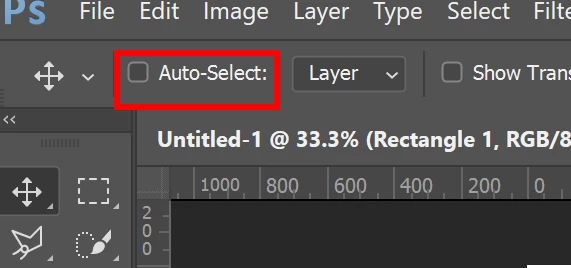
That feature is still there. Make sure when you have the move tool selected, you don't have auto select checked.

2 replies

barbara_a7746676
Community Expert
Community Expert
June 17, 2017

Regardless of whether Auto-Select is turned on or off, you should be able to right-click on the composition and choose any layer that is under your cursor.

Alternatively, you can hold down Command (MAC) or Control (Windows) and click on a pixel with the Move tool and the topmost layer underneath your cursor will become active.

If that doesn't work, please let us know exactly which version of Photoshop you are using.

Chuck Uebele
Community Expert
Chuck UebeleCommunity ExpertCorrect answer
Community Expert
June 16, 2017

That feature is still there. Make sure when you have the move tool selected, you don't have auto select checked.