
The question is in the reply
Title: Photoshop Plugin still shows “Compatible app required” after lowering minimum version requirement (24.2.0 → 24.0.0)
Hi everyone, I’m looking for help investigating an unresolved compatibility issue affecting my Photoshop plugin Lipika.
Users previously reported receiving “Compatible app required” inside Creative Cloud Desktop even though their installed Photoshop version appeared to meet the declared compatibility requirements.
To address this, I updated and republished the plugin with a lower minimum supported version: * Previous minimum requirement: Photoshop 24.2.0+ Updated minimum requirement: Photoshop 24.0.0+
My intention is for the plugin to support **Photoshop version 24 and above (including the latest versions) seamlessly.
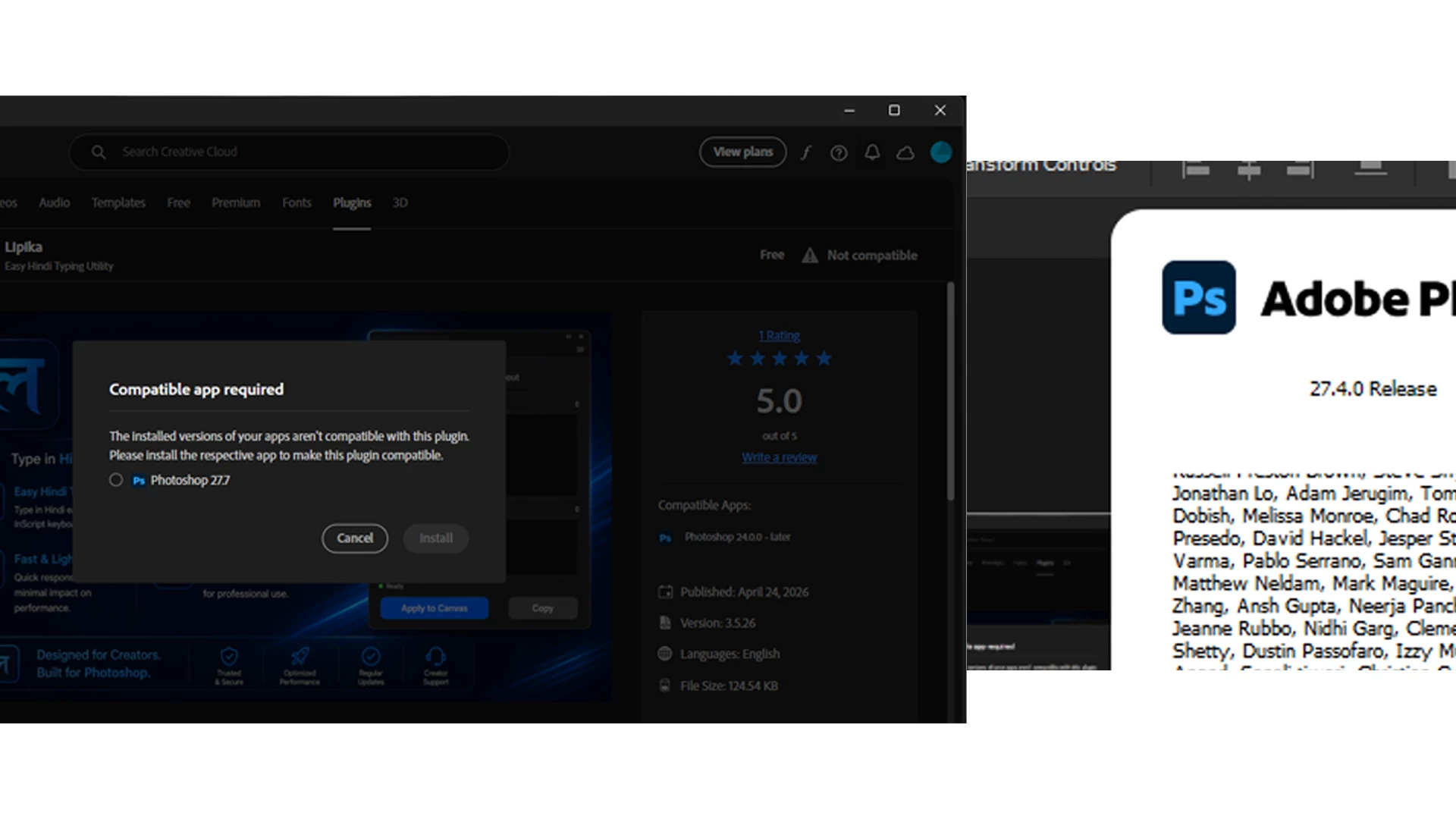
However, after publishing the updated package, the issue still persists. I tested this myself using an environment where a compatible Photoshop version is already installed,
but Creative Cloud Desktop still displays: > “Compatible app required” and prompts installation of a newer Photoshop version despite the installed version appearing to satisfy the declared minimum requirement. ### Current setup / observations * Plugin: **Lipika (latest published version)** * Installed Photoshop version: **27.4.0 Release** * Manifest `host.minVersion`: **24.0.0** * Intended compatibility range: **24.0.0 and above** * Compatible Photoshop version already installed *
Creative Cloud Desktop still blocks installation due to compatibility detection I’ve attached: * Screenshot showing the Creative Cloud compatibility message *
Screenshot showing the currently installed Photoshop version * Screenshot of the manifest configuration
At this point, I’m trying to understand whether the issue could be related to: * Cached compatibility metadata * Package metadata not updating after republishing * Marketplace listing configuration overriding package settings * Installer-side compatibility evaluation * Version detection mismatch * Stale compatibility information inside UPIC or Creative Cloud Desktop I would appreciate guidance on these questions: 1. Does Creative Cloud Desktop cache compatibility information from previous submissions? 2. Is compatibility determined from Marketplace configuration, the uploaded CCX package, or both? 3. Is there a way to inspect the final compatibility metadata Adobe reads after publication? 4. Could UPIC or Creative Cloud Desktop still be using older compatibility data? 5. Are there known cases where installed Photoshop versions are not detected correctly? 6. Is there a recommended way to validate the published package before release? This issue is becoming important because users who already meet the requirements are unable to install the plugin, and repeated installation failures may affect user trust. If additional details are needed, I can provide: * CCX package * manifest configuration * reproduction steps * screenshots * affected environment information Thanks in advance for any guidance or investigation suggestions. also attached manifest file image in png
 AdChoices